30 Day Pilot: Automated Appointment Booking for Small Service Teams
Get automated appointment booking live in days. Reduce no shows, capture after hours bookings, free staff time, and test a 30 day RingPort pilot.
How many customers are slipping away before you can answer?
Answer 4 quick questions and get a simple missed-call estimate for your business.
Answer with one tap. Contact details come after your result.
Here is the estimate.
Thanks. Your result was received.
Appointment booking automation reliably increases bookings, cuts no-shows, and frees up staff hours that used to disappear into phone tag. If you're weighing whether to adopt it, the answer is yes, and the fastest path is an AI-enabled receptionist and booking workflow that captures after-hours leads and handles reminders automatically. Expect the biggest wins in month one: more after-hours bookings, fewer no-shows, and staff hours you can redirect toward paying work.
TL;DR:
- Implementing AI-enabled appointment booking can significantly increase after-hours bookings and reduce staff hours spent on scheduling tasks.
- Automated systems handle real-time calendar sync, multi-channel reminders, smart routing, and centralized client records, preventing double-bookings and scattered data.
- Launching a booking automation usually takes only a few days when focusing on defining services, setting rules, and testing thoroughly from a mobile device.
- Using a tiered pricing model, most businesses see a return within the first month through lower no-show rates, more after-hours bookings, and time saved for paying work.
- Small teams benefit most from AI receptionists that answer calls, route appointments, and send reminders, especially if they track key metrics like no-shows and revenue per appointment.
Table of Contents
- What Does Appointment Booking Automation Actually Include?
- How Do You Set Up Appointment Booking Automation?
- Which Reminder Sequence Actually Lowers No-Shows?
- What Integrations Keep Your Client Records Straight?
- What Should Pricing and ROI Look Like in Month One?
- How RingPort Fits This Approach
- Is Appointment Booking Automation Right for Your Business Now?
- Try RingPort's Fast Agent Before You Commit to Anything Bigger
- Sources
What Does Appointment Booking Automation Actually Include?
A real automated scheduling solution does more than put a calendar on your website. It handles the entire booking conversation, from first contact to confirmed appointment, without a human touching most of it.
Here's what separates a genuine automated appointment scheduling system from a glorified calendar widget:
- 24/7 booking through web and phone. Conversational intake captures leads at 9 p.m. on a Sunday, not just during office hours.
- Real-time calendar sync. Double-booking disappears when your booking tool and calendar share the same live data instead of updating on a delay.
- Multi-channel reminders and follow-ups. Automated confirmations, email and SMS reminders, and rescheduling links keep clients engaged without a staffer sending each message by hand.
- Smart intake and routing. Custom questions at booking route each client to the right staff member or the next available provider, so nobody lands on the wrong technician's calendar.
- Centralized client records. Every booking updates a CRM or spreadsheet automatically, building one client history instead of scattered sticky notes.
Zapier's breakdown of AI appointment booking notes that these automations can craft personalized booking messages, route confirmations, and update calendars and CRMs without manual entry. That's the difference between a booking page and a full appointment management software setup. If your intake process still involves a paper form clipped to a chart, a structured intake workflow closes that gap before it costs you a client.
How Do You Set Up Appointment Booking Automation?
Getting live doesn't take weeks. Most small service businesses can launch a working system in a few days if they follow a tight sequence instead of trying to perfect every setting first.
- Define your services and intake questions. List each bookable service, its duration, and the two or three questions you actually need answered before the appointment (not the twelve you'd like to know).
- Connect your calendar and set the rules. Link Google Calendar or Outlook, then set buffers between appointments, daily booking limits, and blackout windows so the system respects how your day really works.
- Configure reminders and payment options. Decide your reminder cadence and whether deposits or prepayment happen at booking, since that single setting affects your no-show rate more than almost anything else.
- Share your booking link and test it. Embed the link on your site, send it in a text, then book a test appointment yourself and watch what the client sees at every step. Monitor bookings for the first week before assuming everything works.
Pro Tip: Book a test appointment from your own phone using cellular data, not office Wi-Fi. It's the fastest way to catch a broken link or a form that renders wrong on mobile before a real client hits it.
Which Reminder Sequence Actually Lowers No-Shows?
The reminder pattern that works best isn't a single text the day before. It's a confirmation at the moment of booking, a combined email and SMS reminder 24 hours out, and a final SMS an hour before the appointment. Each touch catches a different failure point: forgotten bookings, calendar conflicts that popped up later, and the "I meant to leave five minutes ago" moment.
Payment at booking changes behavior in a way reminders alone can't. A client who's already put down a deposit has a financial reason to show up, not just a social one. Pair that with self-service rescheduling links, so a client who genuinely can't make it moves their own appointment instead of no-showing silently, and your system can automatically offer that freed slot to someone on a waitlist.
To measure progress:
- Track your no-show rate weekly, not monthly, so you catch problems fast.
- Compare no-show rates for appointments with a deposit against those without.
- Test one variable at a time, like moving the 24-hour reminder to 36 hours, and watch the effect for two full weeks.
Automation shifts the reminder workload entirely off your staff's plate. For exact message timing and wording that's been tested against real booking patterns, these reminder templates and confirmation text examples are a faster starting point than writing your own from scratch.
What Integrations Keep Your Client Records Straight?
Scattered records are the quiet cost of manual scheduling. A client calls to reschedule, someone updates the paper calendar, and the CRM never hears about it. Three integrations close that gap:
- Calendar sync (Google Calendar or Outlook). This is the integration that actually prevents double-booking, since the booking tool checks live availability instead of a snapshot from this morning.
- Automatic CRM or spreadsheet updates. Every new booking, cancellation, or reschedule should write to the same record automatically, so your client history stays accurate without anyone re-typing it.
- Webhooks and APIs for custom workflows. Triggering an invoice, notifying a specific staff member, or kicking off a follow-up sequence after a completed appointment usually runs through a webhook rather than a built-in feature.
Microsoft's own AppSource listings for scheduling tools show how deep these calendar integrations typically run inside existing office ecosystems, and it's worth checking that depth before you commit to a platform. On privacy, limit which fields actually sync. A booking tool doesn't need access to full payment details or medical notes just because it's connected to your CRM. Use secure, purpose-built connectors and audit what data moves where every few months. If your calendar setup still feels improvised, a proper Google Calendar booking workflow is worth fixing before you layer on anything else.
What Should Pricing and ROI Look Like in Month One?
Most scheduling automation platforms price on a monthly tiered subscription, sometimes with per-minute or per-call charges for phone-based systems, plus optional add-on credits for extra messaging or call volume. The math that matters isn't the subscription cost alone. It's what that cost buys back.
| Signal to track | What it tells you |
|---|---|
| No-show rate | Direct measure of reminder and deposit effectiveness |
| After-hours bookings per week | Revenue captured that a front desk would have missed |
| Staff hours on scheduling | Time freed up for billable or client-facing work |
| Revenue per appointment | Whether deposits and upsell prompts are working |
Run the numbers for one month before judging the platform. If ten no-shows become three, and five after-hours bookings show up that never would have called during business hours, the subscription usually pays for itself well before the second billing cycle.
How RingPort Fits This Approach
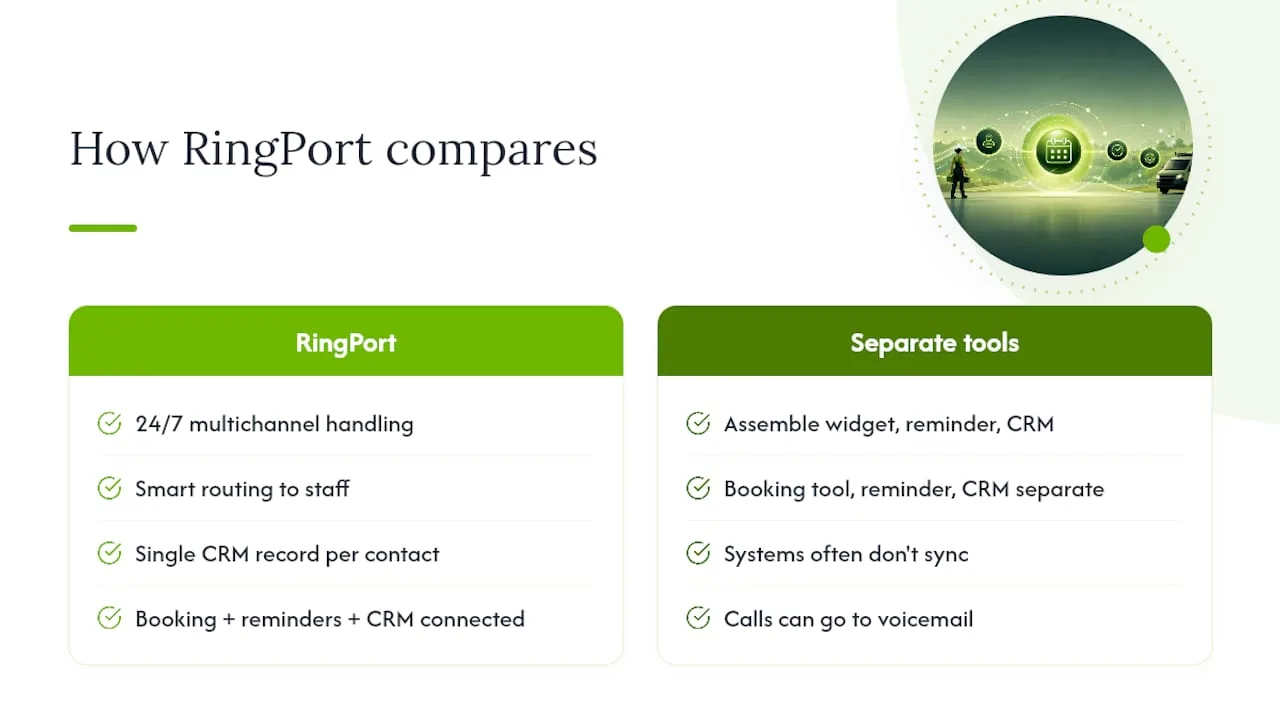
An AI receptionist system can answer calls, texts, and email 24/7, route bookings to the right staff member, and keep a single CRM record for every lead and client. Instead of assembling a booking widget, a separate reminder tool, and a CRM that never quite talks to either one, some platforms handle call answering, smart routing, and appointment scheduling as one connected system.
Some small teams report smoother booking flow and better lead conversion when calls do not go to voicemail and leads are answered promptly. For a business running one or two people at the front desk, that's the difference between chasing missed calls and actually working the schedule they already have.
Is Appointment Booking Automation Right for Your Business Now?
Look at four numbers: weekly call volume, after-hours leads you're currently missing, your current no-show rate, and hours staff spend scheduling by hand. If any of those feel painful, pilot automation on one high-value service for 30 days and measure the shift before rolling it out everywhere.
— Serhii
Try RingPort's Fast Agent Before You Commit to Anything Bigger
Some platforms offer practical starting points if you're comparing full-scale scheduling platforms against something you can run day to day without a dedicated operations person. Where enterprise scheduling suites like the ones Deputy and Legion build for shift-based workforces solve staff coverage, Ringport solves the client-facing side: answering, booking, and following up automatically, at a scale built for a solo owner or small team rather than a 200-person operation.
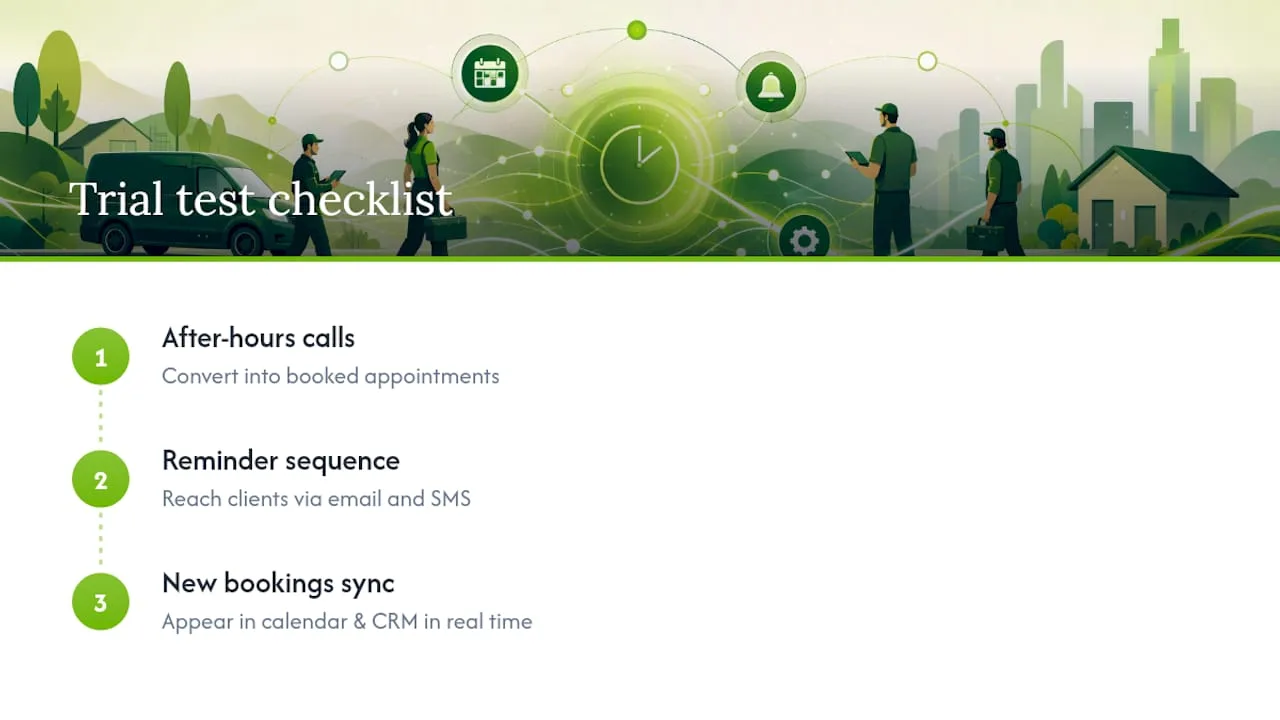
During a trial, test three things specifically: whether after-hours calls actually convert into booked appointments, whether the reminder sequence reaches clients on both email and SMS without extra setup, and whether new bookings show up correctly in your calendar and CRM in real time. If you run field crews or juggle multiple techs on the same schedule, this scheduling workflow guide is a useful companion for the coordination side.
Start with RingPort Fast Agent to see the AI receptionist handle a live call, or visit Ringport's main site to book a demo and walk through your specific call and booking volume before you decide.