4–6 Week Pilot: Medical Phone Triage for Practice Managers
Practice managers: run a 4 to 6 week medical phone triage pilot, cut hold times up to 75%, automate scheduling for nonclinical calls, and meet HIPAA and...

How many customers are slipping away before you can answer?
Answer 4 quick questions and get a simple missed-call estimate for your business.
Answer with one tap. Contact details come after your result.
Here is the estimate.
Thanks. Your result was received.
Yes, AI receptionists can handle non-clinical medical office phone triage tasks like scheduling, intake, and routing when they're configured with proper EHR integration and clear escalation rules. Practices using AI-supported patient access workflows report hold time cuts of up to 75% and labor capacity gains of up to 220%, according to MGMA research on AI-supported access.
TL;DR:
- Automation is most effective when starting with high-volume, rules-based tasks like scheduling and after-hours booking, which account for the majority of calls in 81% of practices.
- Successful rollout depends on testing EHR integration, establishing clear escalation paths, and maintaining human involvement for clinical questions or complex calls.
- Vendors must sign a BAA, encrypt data, and enable audit logs to remain HIPAA compliant, while outbound AI calls require patient consent under TCPA rules.
- A four- to six-week pilot period allows for meaningful evaluation of answer rates, appointment conversions, and staff time savings before expanding automation scope.
- Practices should monitor call transcripts and regularly review escalation processes to prevent automation from handling clinical questions or causing patient dissatisfaction.
Table of Contents
- What non-clinical phone triage covers and why it matters
- Which practices see the fastest wins from phone automation
- A step-by-step rollout for administrative phone triage
- Staying compliant: HIPAA, BAAs, and TCPA basics
- Measuring success with the right KPIs
- Pitfalls to avoid and practices that protect the patient experience
- What rolling out phone automation actually teaches you
- RingPort and your next step toward fewer missed calls
- Sources
- FAQ
What non-clinical phone triage covers and why it matters
Non-clinical phone triage means handling the administrative side of every call: scheduling, rescheduling, cancellations, intake questions, general FAQs, and routing to the right person. It never includes assessing symptoms or giving medical advice. That distinction matters because it's what keeps automation inside a safe, defensible lane while still solving your biggest operational headache: the phone.
Most calls hitting your front desk fall into a handful of predictable buckets.
- Scheduling, rescheduling, or canceling appointments
- Prescription refill requests routed to the right staff member
- Directions, hours, and insurance or billing questions
- After-hours callers who would otherwise go to voicemail
These are repetitive, rules-based tasks, which makes them natural candidates for automation rather than a full-time hire.
One data point tells the story: MGMA found that scheduling and rescheduling are the top call reasons for 81% of practices surveyed, which means fixing just that one workflow addresses the bulk of your call volume.
Which practices see the fastest wins from phone automation
Inbound scheduling and after-hours booking deliver the fastest, most visible return. Once those are stable, referral coordination and pre-procedure outreach calls are natural next steps for the same system.
- Primary care and pediatrics see high call volume tied to routine scheduling and refills
- GI and other procedural groups benefit from structured pre-visit outreach and confirmation calls
- Multi-provider practices gain the most from routing calls correctly on the first try
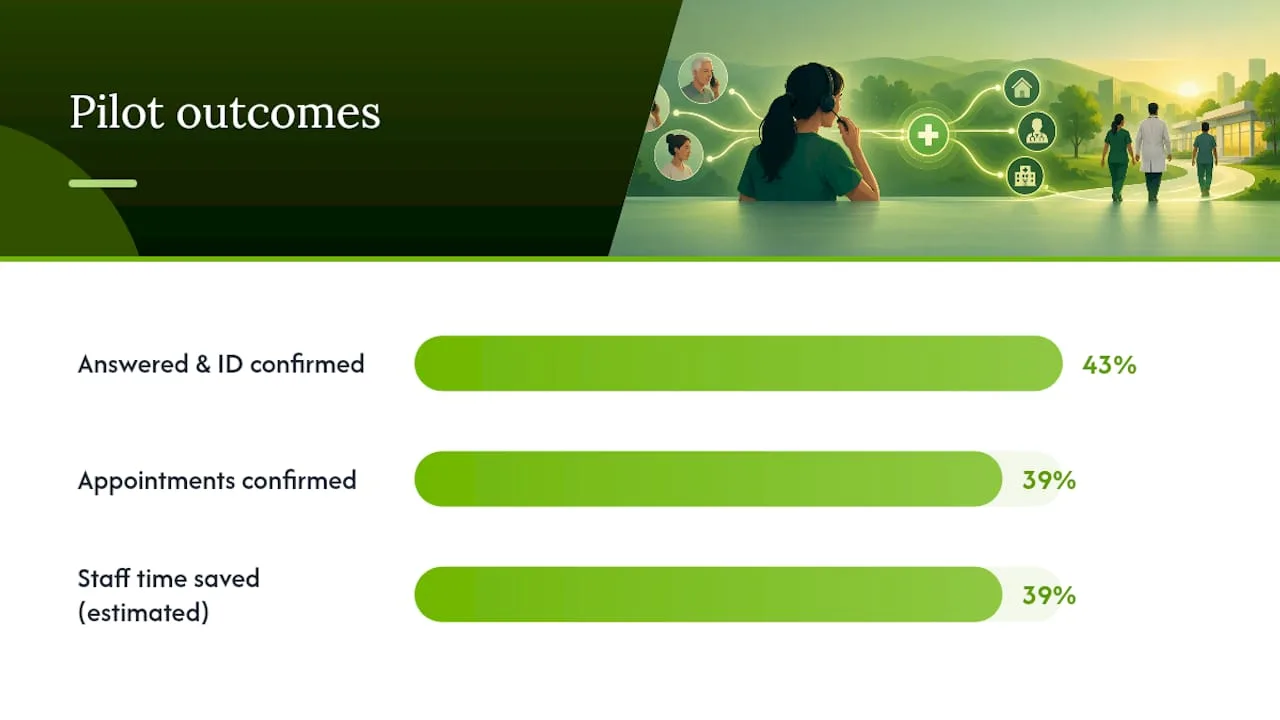
An AMA-reported pilot with Atlantic Health found that AI outreach for colonoscopy prep answered and confirmed identity on 43% of calls, with 39% of calls confirming appointments and staff time on outreach dropping by an estimated 39% in early results. That's the kind of measurable movement a well-scoped pilot can produce within weeks, not months.
Pro Tip: Start with the highest-volume, lowest-complexity call type you have, usually scheduling, before expanding to referrals or outreach.
A step-by-step rollout for administrative phone triage
Rolling out phone automation works best as a sequence, not a single switch flip.
- Measure your baseline: track call volumes, abandonment, and the top reasons patients call for two to four weeks.
- Pick your starting scope, typically scheduling and after-hours booking, and map the exact conversation flow with scripted rules.
- Confirm EHR or practice management integration and test bidirectional booking: patient verification, visit types, and provider-specific rules.
- Build escalation paths, including warm-transfer flows to a human, plus a QA process to sample calls regularly.
- Run a pilot with defined KPIs, review sample calls weekly, adjust scripts, then scale to additional call types.
Before going live, confirm these basics with your team or vendor.
- Patient identity verification works against your actual records, not test data
- Provider schedules sync in both directions without manual re-entry
- Every script has a clear, tested path to a live staff member
Warm transfer and cold transfer each work differently for escalation, and choosing the right one for each scenario protects the patient experience when a call needs a human. MGMA's guidance on rules engines also recommends starting with your highest-volume, most rules-based tasks first, exactly the order followed above.
Staying compliant: HIPAA, BAAs, and TCPA basics
Before any vendor touches your patient data, confirm they qualify as a business associate. Under HHS guidance on cloud computing and HIPAA, any provider that creates, receives, maintains, or transmits electronic protected health information is a business associate, and a signed BAA is required, along with a documented risk analysis and appropriate safeguards.
- Confirm your vendor signs a BAA before any patient data flows through the system
- Verify the platform encrypts data in transit and at rest
- Keep audit logs and transcripts available for compliance review
- Maintain a human handoff for anything outside the scripted flow
Outbound calls carry their own rules. The FCC's guidance on robocalls treats AI-generated voices as artificial or prerecorded voices under the TCPA, which means prior express consent, clear identification, and opt-out disclosures are required for many outbound appointment reminders and outreach calls.
Measuring success with the right KPIs
A pilot only proves its worth when you're tracking the right numbers from day one.
- Answer rate and abandoned-call rate
- After-hours appointments captured
- Booked appointments generated from inbound call volume
- Staff minutes saved per day or week
- Change in no-show rate after automated reminders
A simple ROI estimate works well for early pilots: recovered appointments multiplied by your average visit value, minus the vendor's monthly cost. Run the pilot for four to six weeks, long enough to smooth out weekly variation, and review results against your baseline numbers before deciding whether to expand scope.
Pitfalls to avoid and practices that protect the patient experience
The biggest mistake practices make is letting the system drift toward clinical judgment calls it was never meant to handle. Every clinical question, no matter how minor it sounds, should route to staff immediately.
- Test full booking scenarios in your live EHR with real patient records before launch, not just demo data
- Offer routing to a human in every language you serve, not just English
- Review call transcripts and escalation logs weekly, not just at launch
- Put change control around scripts so updates get tested before going live
AHRQ's guidance on patient communication notes that systems offering a clear route to a human tend to improve patient satisfaction by cutting hold times and answering routine questions immediately, which runs counter to the assumption that automation always frustrates patients.
Pro Tip: Review a random sample of calls every week during your first two months, not just the ones that triggered a complaint.
What rolling out phone automation actually teaches you
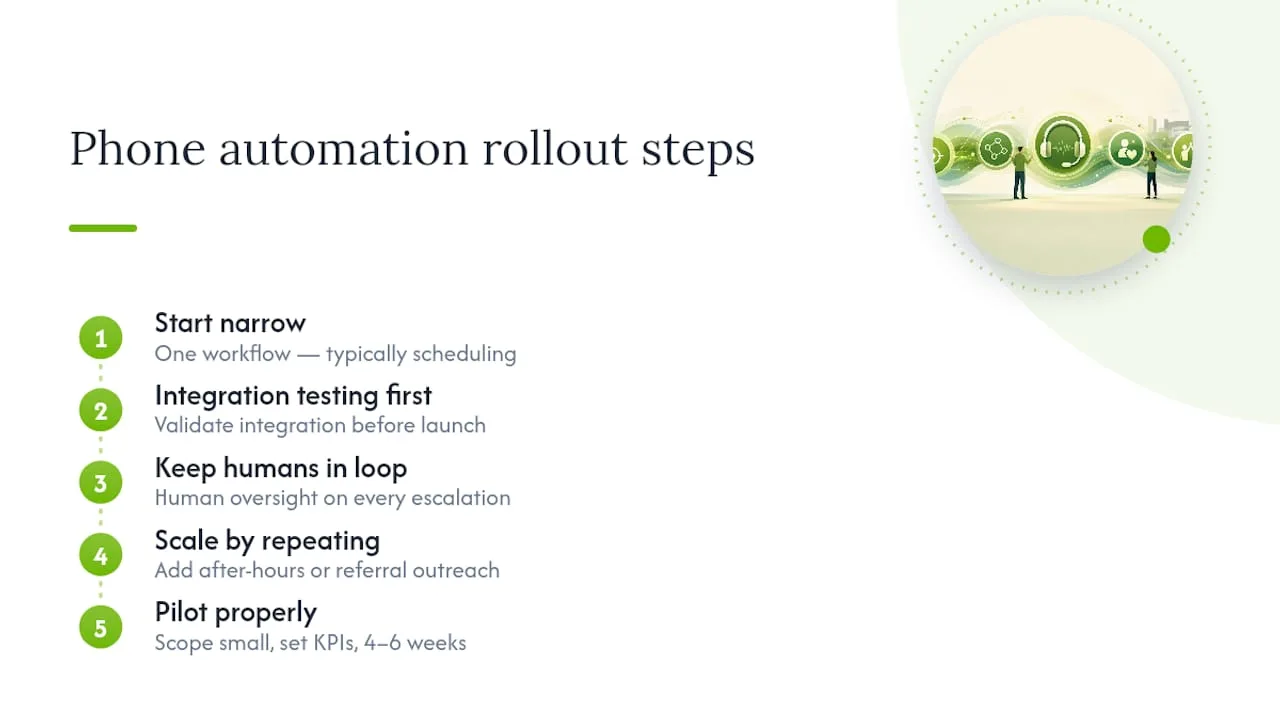
The practices that succeed with phone automation start narrow. They pick one workflow, usually scheduling, get the integration testing right before anything else, and keep a human in the loop for every escalation path. Skipping integration testing is the single most common reason a rollout stalls after launch.
Once that first workflow runs cleanly, expanding to after-hours capture or referral outreach becomes a matter of repeating the same process, not reinventing it. If you're weighing a pilot, scope it small, define your KPIs from the list above before you start, and give it a real four to six weeks before judging the results.
— Serhii
RingPort and your next step toward fewer missed calls
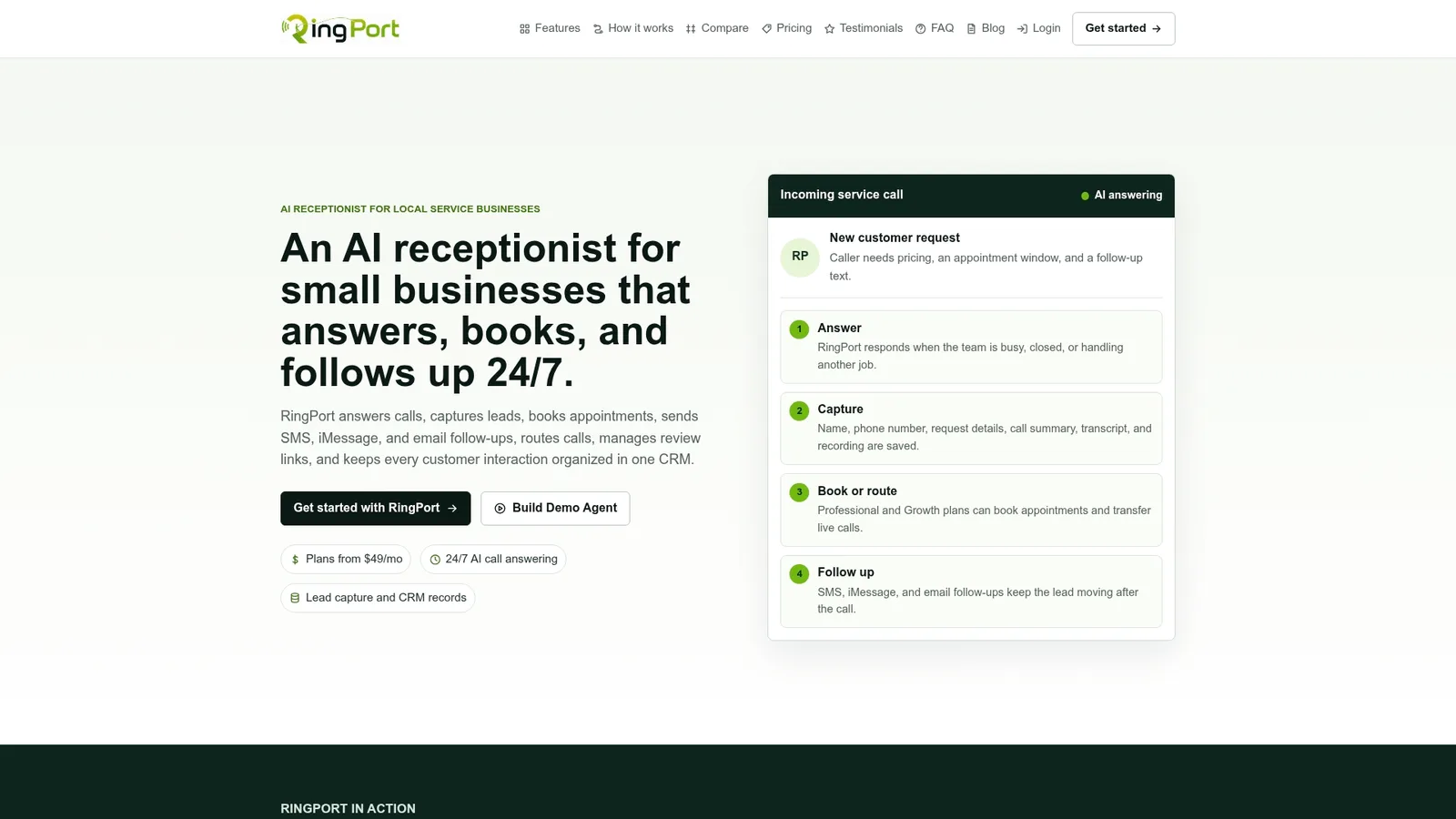
RingPort is built for exactly this job: 24/7 AI call answering, appointment booking, smart routing, and CRM workflows that keep every call and lead organized without adding headcount. It supports warm-transfer handoffs to staff, which matters for any call that needs a human touch.
Before choosing any vendor for phone triage, confirm they offer a BAA, maintain audit logs, and let you test EHR integration thoroughly before go-live. Those are non-negotiable checkpoints regardless of which platform you choose.
| What you need | Why it matters |
|---|---|
| 24/7 call answering | Captures after-hours callers instead of losing them to voicemail |
| Smart routing and warm transfer | Keeps clinical questions with staff, admin tasks automated |
| CRM and follow-up workflows | Keeps leads and appointments organized in one place |
RingPort offers pricing plans and pay-as-you-go add-ons for extra call volume; current prices and details are available at Ringport. A good starting point is piloting after-hours scheduling or overflow calls with the KPIs covered earlier, then expanding once you see the numbers move. For high-volume practices, the RingPort Fast Agent is worth reviewing for handling larger call loads.
Sources
- Rethinking patient access with AI (MGMA webinar)
- Stop unwanted robocalls and texts (FCC consumer guide)
- Guidance on HIPAA & cloud computing (HHS OCR)
- AHRQ health literacy toolkit
- How AI clears the way for colonoscopy screening (AMA, Atlantic Health pilot)
FAQ
Is AI phone triage safe under HIPAA rules?
It can be, as long as your vendor signs a BAA and follows the safeguards described in HHS guidance on cloud computing. Ask specifically about encryption, audit logging, and how the vendor handles a risk analysis before you sign anything.
Can AI receptionists book directly into my EHR?
Many platforms support bidirectional booking, meaning the system checks real provider availability and writes confirmed appointments back into your schedule automatically. Always test this with real patient records before full rollout, since integration quality varies by EHR and vendor.
Do outbound reminder calls need patient consent?
Yes. The FCC treats AI-generated voices as artificial or prerecorded under the TCPA, which means you need prior express consent, clear identification, and opt-out options for most outbound calls.
How long should a phone automation pilot run?
Four to six weeks gives you enough data to smooth out normal weekly variation in call volume. Track answer rate, after-hours bookings, and staff minutes saved, then compare against your baseline before deciding whether to expand.
What happens when a call needs clinical judgment?
The system should never attempt to answer a clinical question. It should route that call to staff immediately, with a warm transfer whenever possible so the patient doesn't have to repeat themselves.