4 Low Cost Solo Business Call Answering Options Set Up in a Day
Compare four low cost solo business call answering options, learn fast setup steps, and try Ringport's $49 Starter plan during a 48–72 hour test.

How many customers are slipping away before you can answer?
Answer 4 quick questions and get a simple missed-call estimate for your business.
Answer with one tap. Contact details come after your result.
Here is the estimate.
Thanks. Your result was received.
For most solo business owners, an affordable AI receptionist or low-cost answering plan with built-in appointment booking beats every other option on the table. It costs less than a part-time hire, works around the clock, and captures the calls you'd otherwise miss while you're on a job site or with another client. The sections below walk through the specific options, their costs, and how to get one running fast.
TL;DR:
- For businesses with high after-hours call volume and appointment booking needs, AI receptionists provide 24/7 coverage and direct calendar integration that human services may lack.
- Low-cost answering services around $25 per month are suitable for businesses with predictable, moderate call volumes but lack automation features.
- Call volume and the share of after-hours calls are critical factors; tracking these metrics over 48 to 72 hours helps determine the best, most cost-effective solution.
- Setting up call answering systems requires script preparation, technical configuration, and testing within a few hours to avoid missing leads or misrouting calls.
- Security concerns include ensuring data encryption, compliance standards, and prompt revocation of access when switching providers to protect sensitive caller information.
Table of Contents
- What Are Your Options for Solo Business Call Answering?
- How Do You Choose the Right Call-Answering Approach?
- What Does Solo Business Call Answering Cost?
- How Fast Can You Set Up Call Answering?
- How Ringport Handles the Solo Owner's Call Problem
- Is Your Caller Data Actually Private?
- How Do You Keep Your Phone Greeting Sounding Like You?
- What Does Successful Call Answering Look Like in Practice?
- What Should You Do Next?
- Try Ringport Before You Commit to Anything Else
- Sources
- FAQ
What Are Your Options for Solo Business Call Answering?
You've got four realistic paths, and each one fits a different stage of business.
DIY and low-cost tools cover the basics: call forwarding, Google Voice, or voicemail-to-text. They cost almost nothing and take minutes to set up. The tradeoff is you're still the one calling people back, often hours later, with zero booking automation baked in.
Monthly low-cost answering services put a live human on the line to take a message or greeting on your behalf. These work well if you want a real person answering but don't need appointment scheduling folded into the call itself. Most plans bill a flat monthly rate for a set number of minutes or calls.
Pay-as-you-go services charge per minute or per call, which makes sense if your phone rings rarely and unpredictably. A landscaper who gets six calls a month doesn't need a flat-rate plan sized for sixty.
AI receptionists answer 24/7, ask qualifying questions, book appointments directly onto your calendar, and text callers back automatically. This category has matured fast. AI receptionist platforms now commonly bundle lead qualification, call summaries, and CRM syncing into one subscription.
So which one fits? If most of your business comes through referrals and you rarely miss a call, voicemail plus a fast text reply might be enough. But once after-hours calls, no-show follow-ups, or missed bookings start costing you real revenue, it's time to move to a live or AI-based option that never sleeps.
- Forwarding and voicemail-to-text: near-zero cost, manual callback required
- Live low-cost answering: real person, message-taking only in most entry plans
- Pay-as-you-go: best for sporadic, low-volume callers
- AI receptionist: 24/7 coverage plus booking, ideal for appointment-driven businesses
How Do You Choose the Right Call-Answering Approach?
Start with your numbers, not the sales pitch. Here's the order that actually matters.
- Count your monthly inbound calls. Ten calls a month and fifty calls a month point to different solutions entirely.
- Figure out your after-hours share. If a third of your calls land after 6 PM or on weekends, that's the gap costing you leads right now.
- Decide if you need booking, not just messages. A plumber taking emergency calls needs scheduling built in; a consultant doing intro calls might not.
- Check integrations. Does the service sync with your calendar or CRM, or will you be copying details by hand every day?
- Set your budget ceiling and stick to it during trials.
When you're testing a vendor, ask direct questions: How long does setup take? Where do messages get delivered, text, email, or both? Can I customize the greeting myself? What happens to calls during a transfer or hold? And what's the cancellation policy if it doesn't work out?
Watch for red flags during any trial. Opaque per-minute billing that doesn't show a running total, no calendar sync of any kind, no immediate text-back for missed calls, or transfer times that leave callers on hold for a minute or more. Any one of these should make you pause before committing.
Pro Tip: Run a 48 to 72 hour test before signing anything longer than a month. Track your answer rate and how many calls converted into booked appointments. That short window tells you more than any features list.
The simplest decision flow: estimate how many calls you're currently missing, pick the cheapest option that covers after-hours coverage and booking, then test it for a few days before trusting it with your whole call volume.
What Does Solo Business Call Answering Cost?
Pricing splits into three shapes, and knowing which one you're looking at prevents surprise bills.
Free or near-free tools like Google Voice or basic carrier forwarding cost you nothing monthly, but you pay in time. Every voicemail still needs a manual callback, and there's no booking automation at all.
Low-cost monthly answering plans often start around $25 per month for basic message-taking with a live agent. That entry tier usually covers a limited number of minutes and a simple greeting script, not appointment scheduling.
Pay-as-you-go pricing works in your favor when your call volume is genuinely low and irregular. It gets expensive fast once your business scales past a trickle of calls, since per-minute rates add up quicker than a flat plan.
AI receptionist pricing typically follows a base monthly fee plus usage tiers. At Ringport, the Starter plan runs $49 per month, Professional is $149, and Growth is $299, scaling with call volume, routing complexity, and CRM depth.
Roughly 62% of inbound calls to small businesses go unanswered, according to industry call-tracking research. If you book even a fraction of those recovered calls, a $49 monthly plan pays for itself with a single new client.
- Free/near-free: forwarding, Google Voice, voicemail-to-text
- Entry-level live answering: roughly $25/month for basic message-taking
- Pay-as-you-go: economical only at very low call volumes
- AI receptionist: base fee plus usage, scaling with call and booking volume
How Fast Can You Set Up Call Answering?
You can have a working system live in an afternoon if you follow a clear sequence instead of improvising as you go.
- Prepare your script first. Write a short greeting, confirm your official hours, and list the caller intents that matter most: bookings, emergencies, general questions.
- Configure the technical pieces. Link your calendar, set routing rules for VIP callers and after-hours behavior, and turn on missed-call text-back if your platform supports it. Modern call handling rules let you route by time of day, caller ID, or CRM status without touching a phone system manually.
- Test everything before you go live. Place a few sample calls yourself, simulate what happens after hours, and confirm messages actually land in your inbox or texts.
- Maintain it weekly. Skim your call logs, adjust the script based on what real callers ask, and update your hours before holidays so no one gets an outdated greeting.
Pro Tip: Call your own business line from a different phone before telling a single client it's live. You'll catch script problems and routing mistakes in five minutes that would otherwise cost you a missed lead.
Solo owners who skip the testing step are the ones who find out three weeks later that after-hours calls were routing to a disconnected number the whole time.
How Ringport Handles the Solo Owner's Call Problem
Ringport was built around exactly the job-to-be-done described above: answer every call, book the appointment, and keep the lead warm without hiring anyone.
- 24/7 automated answering that picks up calls whether you're on a roof, in a client meeting, or asleep
- Appointment booking synced directly to your calendar, so calls turn into confirmed slots instead of sticky notes
- Smart routing that forwards VIP callers or urgent requests differently than general inquiries, using CRM-driven rules similar to what larger call systems use
- CRM management that keeps caller history and notes in one place instead of scattered across your phone
- Follow-up channels including SMS and email, so a missed call still gets an immediate response
The Fast Agent demo shows the booking flow in action, useful if you want to see how a caller moves from "just calling to ask" to a confirmed appointment on your calendar without you touching the phone.
Is Your Caller Data Actually Private?
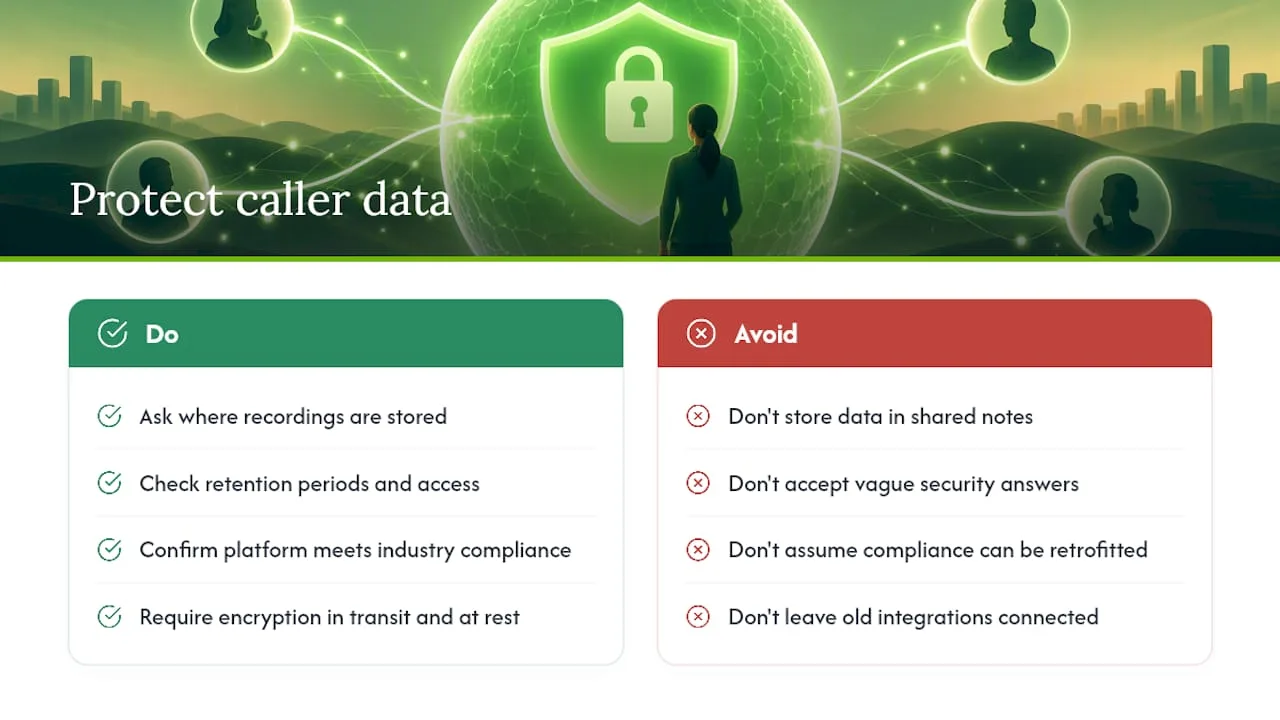
Any call-answering system, human or automated, collects sensitive information: names, addresses, and sometimes payment details if you take deposits over the phone. That data needs to live somewhere secure, not in a shared notes app or a sticky note pile.
Ask any provider you're considering where call transcripts and recordings are stored, how long they're kept, and who inside the company can access them. A legitimate service should give you a straight answer, not a vague reassurance.
If you serve clients in regulated fields, medical offices, legal services, financial consulting, check whether the platform supports the compliance standards your industry requires before you sign up. Not every answering service is built for that, and retrofitting compliance after the fact is far harder than confirming it up front.
Encryption in transit and at rest matters more than it sounds. Call summaries and voicemails often sit on a server somewhere between the call and your inbox, and that's the point where poorly secured systems leak information.
One overlooked detail: revoke access promptly if you ever switch providers or stop using a service. Old integrations left connected to your calendar or CRM are a quiet security risk that solo owners forget about because there's no IT department reminding them to clean it up. Treat your call-answering account the same way you'd treat a bank login: strong password, two-factor authentication where it's offered, and a clear sense of who else has the keys.
How Do You Keep Your Phone Greeting Sounding Like You?
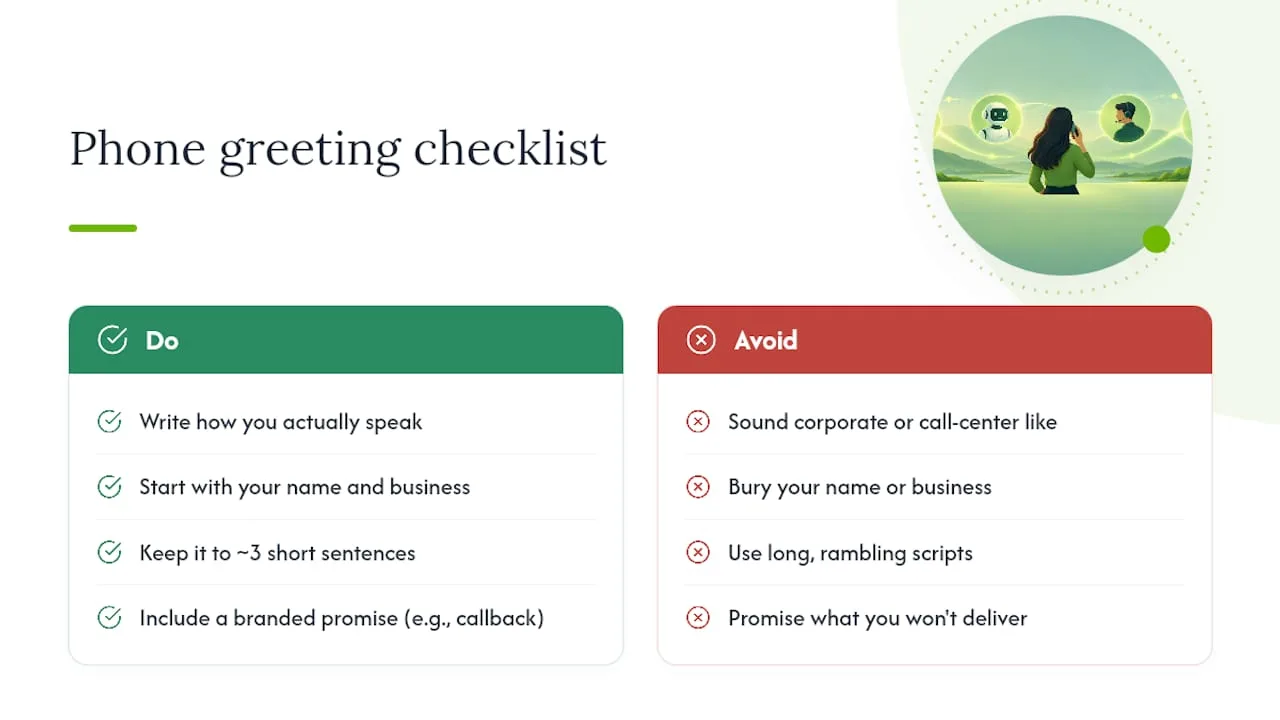
A generic script makes your one-person business sound like a call center, and callers notice. The fix isn't complicated: write your greeting the way you'd actually talk on the phone, then refine it after hearing a few real calls.
Start with your name and business name stated plainly, not buried in a corporate-sounding intro. "Thanks for calling Martinez Plumbing, this is Dana's team" sounds more human than "You've reached the automated answering system for Martinez Plumbing Incorporated."
Keep the script short enough that a caller doesn't zone out waiting for their turn to speak. Three sentences covering who you are, what you can help with, and what happens next is usually enough.
Build in a few branded touches. If you always tell clients "we'll call you back within the hour," say that in the script so the automated system sets the same expectation you would in person. Consistency between your automated answering and your actual follow-up habits is what keeps the whole thing feeling authentic instead of robotic.
If you serve a bilingual community, consider offering a language option in your greeting. Demographic data on U.S. Latino populations shows how meaningful language access can be for local service businesses, and a simple bilingual prompt can be the difference between capturing a lead and losing one.
Revisit your script every few months. Update seasonal messaging, swap out old promotions, and listen to a handful of real call recordings to catch phrasing that sounds stiff or outdated.
What Does Successful Call Answering Look Like in Practice?
Picture a solo electrician who used to lose weekend emergency calls to voicemail because he was elbow-deep in a panel job. Every unanswered call was a potential same-day job going to a competitor who happened to pick up first. Once after-hours calls started routing through automated answering with instant booking, those weekend emergencies turned into confirmed jobs on the calendar before he even finished his current task.
A solo massage therapist faced a different problem: no-shows and double-bookings from managing her calendar by hand while also answering the phone mid-session. Automated appointment booking tied directly to her calendar eliminated the scheduling conflicts entirely, since the system checked availability in real time instead of guessing.
A one-person bookkeeping practice found that most of her missed calls came from potential clients calling during tax season evenings, exactly when she couldn't step away from client work. Automated text-back follow-up after each missed call kept those leads warm until she could call back the next morning, instead of losing them to whichever competitor answered first.
The common thread across all three: the call-answering gap wasn't a marketing problem or a pricing problem. It was a coverage problem, solved by making sure every call got a response, immediately, regardless of what the owner was doing at that moment.
What Should You Do Next?
Pick the option that matches your actual call volume, not the one with the most features. Run a 48 to 72 hour test before committing to anything monthly. Track three numbers: your answer rate, how many calls turned into booked appointments, and your conversion rate per call. Those three metrics tell you more than any sales page will.
— Serhii
Try Ringport Before You Commit to Anything Else
This AI receptionist system serves as an alternative to hiring a receptionist or juggling a patchwork of forwarding rules: one system that answers every call, books the appointment, and follows up automatically, for a flat monthly rate instead of a full-time salary.
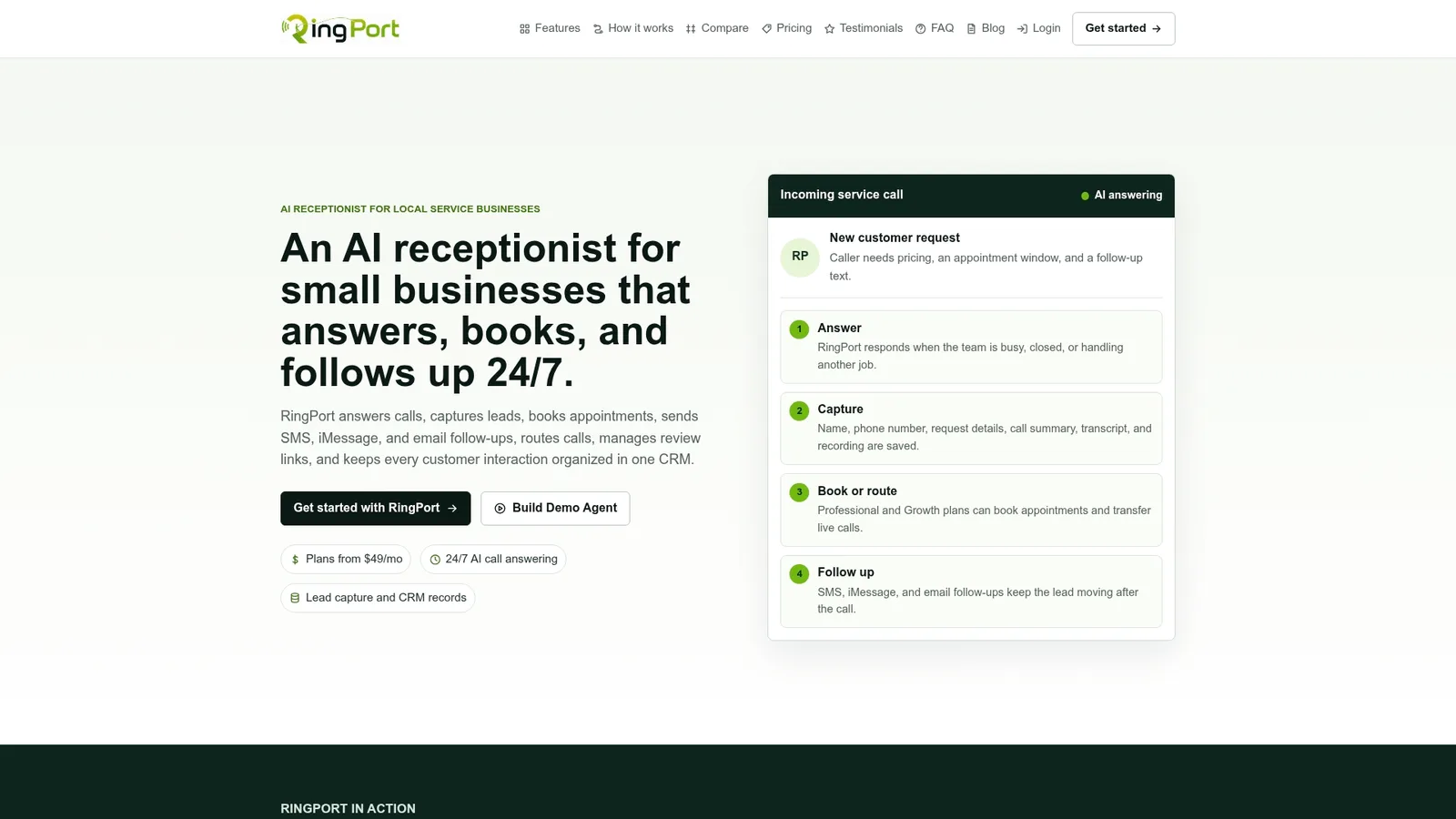
Ringport offers four ways to start: the Starter plan at $49 per month for owners just getting off voicemail, Professional at $149 for higher call volumes and deeper CRM needs, Growth at $299 for busier operations, and a pay-as-you-go option if your call volume is still unpredictable. Before you pick a tier, run through a short trial checklist: test the Fast Agent booking demo to see how a caller moves from question to confirmed appointment, connect your calendar to confirm sync works both ways, and trigger a missed-call scenario to see how quickly the text-back follow-up fires.
If you want a fuller walkthrough of setup steps and escalation rules before you start, the automated call answering setup guide covers the configuration details in more depth. Visit Ringport to compare plans and start a trial today.
Sources
- Sockly
- Missed Call Statistics for Small Businesses 2026
- User call handling — RingCentral Developer Guide
- Key facts about U.S. Latinos | Pew Research Center
FAQ
Can I Get Paid to Answer Phone Calls?
Yes, virtual receptionist and call-answering jobs exist where companies pay individuals to answer calls remotely for other businesses. That's a different setup from what solo business owners need, though. Owners typically hire or subscribe to an answering service rather than working as one.
How Much Does It Cost to Hire an Answering Service?
Live answering services for small businesses often start around $25 per month for basic message-taking plans with limited minutes. Costs rise with call volume, added features like appointment booking, and whether you need 24/7 coverage instead of business-hours only.
What Is the Best Answering Service for a Solo Business?
The right choice depends on your call volume and whether you need booking automation or just message-taking. For appointment-driven businesses, an AI receptionist like Ringport that combines 24/7 answering with direct calendar booking typically delivers more value than a message-only live service at a similar price point.
How Much Does an AI Answering Service Cost for a Small Business?
AI receptionist pricing usually follows a base monthly fee that scales with usage. Ringport's plans run $49 per month for Starter, $149 for Professional, and $299 for Growth, with a pay-as-you-go option available for businesses with lighter or irregular call volumes.