
20 Second Approval Stops Misattributed Call Summaries in CRM for SMBs
Add call summaries to your CRM safely. Run a five field pilot, use a 20 to 30 second approval buffer, fix contact matching, and track the edit rate.

How many customers are slipping away before you can answer?
Answer 4 quick questions and get a simple missed-call estimate for your business.
Answer with one tap. Contact details come after your result.
Here is the estimate.
Thanks. Your result was received.
Yes, automated call summaries can be written straight into your CRM, and they should be. The proven pattern combines structured AI output, field mapping, and a short approval buffer before anything saves to a record. Frameworks like NIST's AI Risk Management guidance and CRM tools like HubSpot's call-logging system already model this workflow. RingPort builds on the same foundation.
TL;DR:
- Accurate contact matching before auto-sync prevents most misattributions and duplicate records during call summary integration.
- Limiting the initial pilot to five essential CRM fields with a short approval buffer improves trust and reduces errors.
- Transcription quality, especially diarization and punctuation, directly impacts summary accuracy and should be monitored closely.
- A brief post-call review window, around 20 to 30 seconds, helps catch misattributions without slowing team workflows.
- Integration bottlenecks usually stem from CRM API limits or high call volumes, so batching and queuing are vital for scaling efforts.
Table of Contents
- How Call Summaries to CRM Systems Actually Work
- How Do You Set Up Call-Summary Integration Step by Step?
- What Should You Extract From a Call and Where Does It Go?
- How Do You Keep Call Summaries Accurate and Compliant?
- Should You Auto-Sync Summaries or Require Approval First?
- Which KPIs Prove the Integration Is Working?
- How RingPort Handles Call Summaries Without the Guesswork
- What Should You Look for in a Call-Summary Vendor?
- How Do You Configure This in HubSpot, Salesforce, or Similar CRMs?
- Do Multi-Language Call Summaries Work the Same Way?
- How Far Can This Scale Before You Hit Limits?
- What Do You Do When the Integration Fails?
- The Real Lesson From Rolling This Out Carefully
- Try Automated Call Summaries With RingPort Before You Build It Yourself
- Sources
- FAQ
How Call Summaries to CRM Systems Actually Work
Every automated call-summary pipeline runs through four stages, and where it breaks usually traces back to one of them.
Capture comes first. Whether the audio originates from a phone carrier line, a softphone app, or a meeting platform determines everything downstream. A carrier-level recording with clean separation between speakers produces a far better transcript than a laptop mic picking up both sides of a call through a speaker.
Transcription turns that audio into text, and quality here hinges on three things: automatic speech recognition (ASR) accuracy, diarization (correctly labeling who said what), and punctuation that preserves meaning. Garbled diarization is the single biggest cause of a summary that assigns the wrong commitment to the wrong person.
Summarization compresses the transcript into something usable, ideally structured as labeled fields rather than a paragraph of prose.
Integration pushes that structured output into the CRM as an activity, note, or custom field.
- Capture point quality sets a ceiling on everything after it
- ASR and diarization errors compound into summarization errors
- Structured JSON output beats free-text summaries for CRM automation
- The integration layer needs field-level mapping, not a dumped transcript
How Do You Set Up Call-Summary Integration Step by Step?
Rolling out CRM call notes integration works best as a five-step pilot, not a full-company flip of a switch.
- Pick your capture sources. Enable recording and transcripts for one team or one line first, not the whole organization.
- Define a minimal summary schema. Five fields cover most needs: summary, decisions, next steps, owner, and timestamp.
- Set contact-matching rules and stress-test them. Shared office numbers, blocked caller ID, and anonymized mobile calls all break naive phone-number matching.
- Choose your sync behavior. Auto-sync, review-and-approve, or a hybrid where only high-value deals require a human look. Make writes idempotent so a retry never creates a duplicate record.
- Run the pilot and track the edit rate. How often reps change the AI summary before it saves tells you whether the schema and prompt actually fit your sales language.
Pro Tip: Start the pilot with five CRM fields, not fifty. A narrow, accurate mapping builds trust with the sales team faster than a wide one that gets ignored after week one.
What Should You Extract From a Call and Where Does It Go?
A good call recording summary to CRM workflow extracts a short, fixed set of elements. Anything more turns into noise nobody reads.
- A one-line TL;DR that a manager can scan in five seconds
- Decisions and commitments made during the call, stated plainly
- Next steps with a clear action, not a vague intention
- An assigned owner for each next step
- A follow-up deadline tied to a real date
Map the TL;DR and full summary to the CRM's activity or note field. Decisions and next steps work best as custom fields or linked tasks, since that lets sales dashboards and reporting tools query them directly. Keep the underlying output in labeled JSON keys rather than a single text blob. That structure is what lets automation and analytics tools consume it later without a human reparsing sentences to figure out what happened on the call.
How Do You Keep Call Summaries Accurate and Compliant?
Accuracy and privacy problems in automated call logs almost always trace back to skipped safeguards, not bad AI models.
- Use a short review window, often 20 to 30 seconds, or a manual approval step before anything writes permanently to a record
- Flag or redact sensitive personal information before it ever reaches a summary field
- Apply role-based access so summary content is visible only to people who need it
- Require vendors to document encryption in transit and at rest, audit logging, and a clear data retention policy
The 20-second rule: RingCentral's HubSpot integration uses a brief post-call buffer that lets a user edit or confirm a call log before it locks in. That small delay catches misattributed calls without slowing the team down.
Following OWASP's GenAI Top 10 also matters here, since it directly addresses the failure modes specific to generative summaries: prompt injection, data leakage, and outright hallucinated details that sound plausible but never happened on the call.
Should You Auto-Sync Summaries or Require Approval First?
The choice between auto-sync and review-and-approve isn't binary, and treating it that way is where most rollouts stall.
Auto-sync earns its place once ASR accuracy is proven and the pilot group trusts the output. Anything touching a high-value deal, a legal commitment, or a regulated interaction should still route through human approval regardless of how good the model tests.
- Build a fallback flow for calls that can't be matched to a contact automatically
- Make every write idempotent so a retry never duplicates a logged call
- Use retry logic and a dead-letter queue to catch failed syncs instead of silently losing them
- Give reps a fast correction UI so fixing a mapping error takes seconds, not a support ticket
If the edit rate stays low, loosen the approval buffer gradually instead of removing it all at once.*
Which KPIs Prove the Integration Is Working?
Three numbers tell you whether syncing call data to CRM is actually paying off, beyond the general sense that "it feels faster."
- After-call work (ACW) reduction, measured in minutes saved per rep per day
- Sync accuracy rate, meaning the percentage of summaries correctly attached to the right contact or deal
- Edit rate, the share of AI summaries a rep changes before it syncs
A rising edit rate is an early warning sign, often pointing to transcription quality drifting or a schema mismatch with how your team actually talks about deals. Beyond those three, track downstream signals: faster follow-up times, higher task completion rates, and whether deals with a synced summary close at a different rate than deals without one. Run a periodic audit sample rather than assuming week-one accuracy holds forever.
How RingPort Handles Call Summaries Without the Guesswork
An AI receptionist can answer and summarize every call automatically, route it to the right person, and produce CRM-ready output tied to lead and appointment records. Because it already handles the phone side, contact-matching starts from a cleaner signal than a system bolted onto a generic dialer.
For anyone piloting this internally, the practical order matters: map a small set of fields first, require approval on anything tied to a high-value lead, and confirm contact-matching works before flipping on auto-sync. Skipping that last check is the most common way teams end up with duplicate or misattributed records in the first two weeks. Small service businesses using automated call handling and follow-up tend to report faster response times and fewer missed leads once the workflow settles in, which is really the whole point of writing summaries into a CRM in the first place.
What Should You Look for in a Call-Summary Vendor?
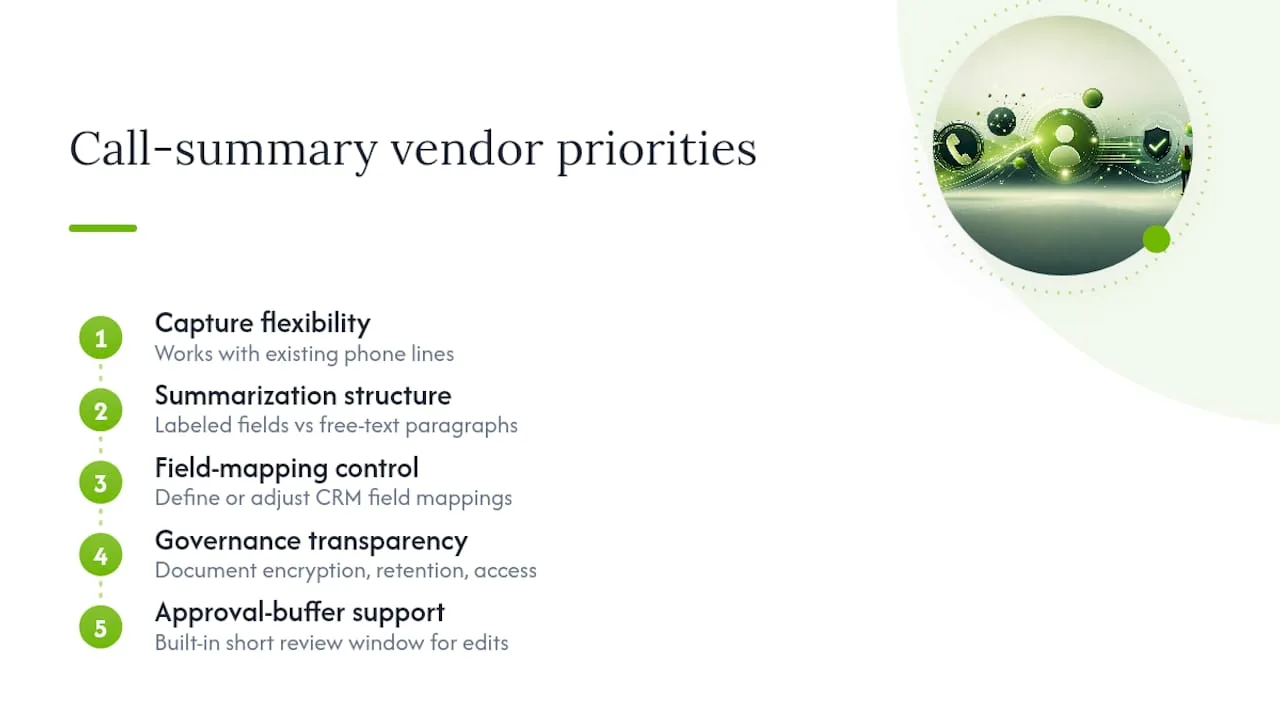
Choosing a provider for AI call summaries comes down to five practical criteria, not a feature checklist.
Capture flexibility matters first: does the tool work with your existing phone lines, or does it require ripping out your current setup? Summarization structure matters second, since a vendor that only outputs free-text paragraphs will cost you more integration work than one that outputs labeled fields from the start.
Field-mapping control is the third criterion. Look for a system that lets you define or adjust which CRM fields receive which summary elements, rather than a fixed one-size mapping. Governance transparency comes fourth: a vendor should document encryption, retention, and access controls without you having to ask twice, in line with the practices NIST's framework recommends for any AI system that writes into business records.
Finally, weigh approval-buffer support. Some vendors, like RingCentral's HubSpot integration, build in a short review window as a native feature rather than something you have to engineer yourself. That single detail often separates a smooth rollout from a messy one, since it's the cheapest control against misattributed records.
Weigh these five against your call volume and team size. A five-person service business has very different tolerance for setup complexity than a fifty-seat support floor, and the right vendor for one is often the wrong fit for the other.
How Do You Configure This in HubSpot, Salesforce, or Similar CRMs?
The exact screens differ, but the configuration logic is nearly identical across major CRM platforms.
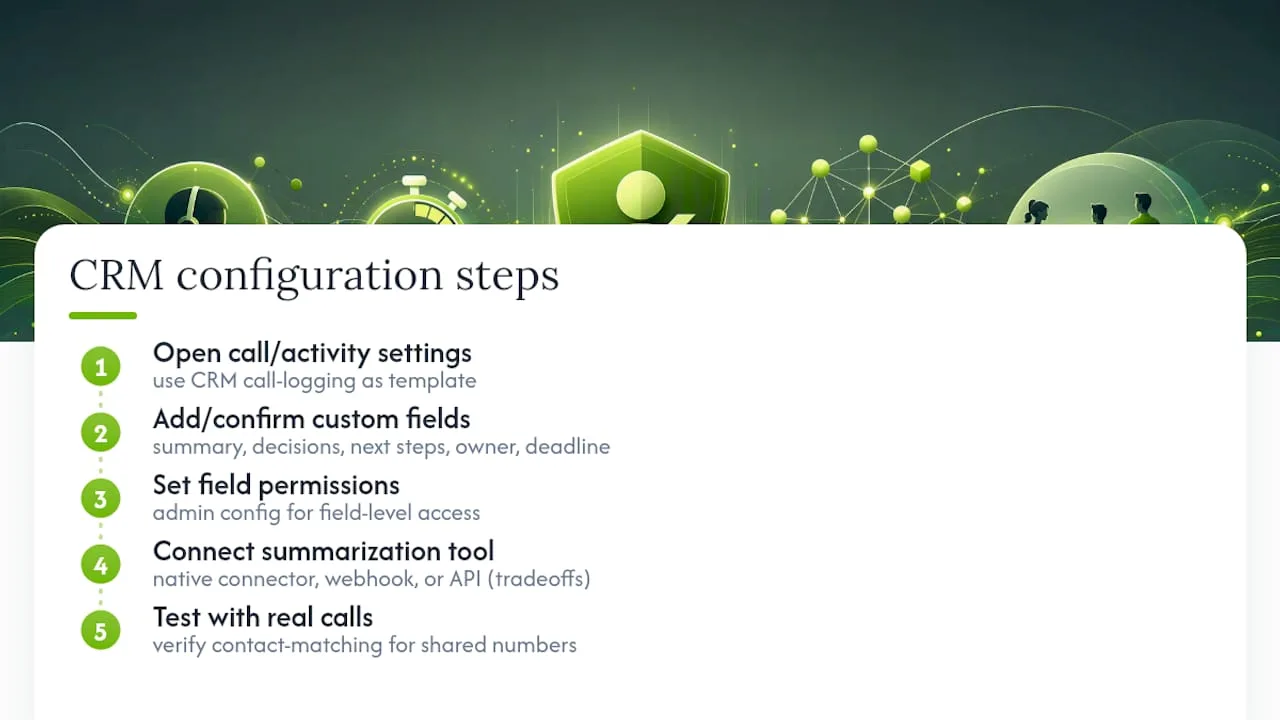
Start in the CRM's call-logging or activity settings. HubSpot's call-logging tool, for example, automatically records calls and attaches them to contact records, which gives you a template for how your summary fields should attach. Salesforce and similar platforms follow the same logic through their activity and task objects.
Next, create or confirm the custom fields that will hold your summary schema: summary text, decisions, next steps, owner, and deadline. Most CRMs let you add these under a contact, deal, or ticket object without developer involvement, though field-level permissions usually need an admin.
Then connect the summarization tool through whichever integration layer it supports, typically a native connector, a webhook, or a direct API call. Native connectors are fastest to set up but offer less control over exactly which fields get written. Webhooks and API integrations take longer to configure but let you decide precisely how each summary element lands in the CRM, which matters once you move past the five-field pilot mapping.
Test with a handful of real calls before opening it to the full team. Confirm the contact-matching logic correctly attaches calls even when a number is shared across a household or an office line, since that's the single most common early failure point.
Do Multi-Language Call Summaries Work the Same Way?
Multi-language support adds one extra step to the pipeline, not a redesign. The ASR engine has to correctly detect the spoken language before transcription even starts, and misdetection here cascades into a summary that's confidently wrong in a different language than the call actually happened in.
Once language detection is solid, most summarization models can output in the reader's preferred language regardless of the call's original language, which matters for distributed sales teams. A support manager in Chicago and a rep who took a call in Spanish can both read the same summary in English if the pipeline is configured that way.
The practical challenge is less about translation quality and more about consistency: make sure your summary schema field names stay in a single language across every record, even when the summary content itself varies. Mixing schema languages breaks reporting and any downstream automation that expects a specific field key.
How Far Can This Scale Before You Hit Limits?
Call-summary integrations scale well up to a point, and the bottleneck is rarely the AI summarization step itself. It's usually the CRM's API rate limits or the volume of concurrent webhook calls the integration layer can handle during peak hours.
A five-person team syncing a few dozen calls a day will never notice a rate limit. A fifty-seat call center pushing thousands of calls through the same integration window can, especially if every call also triggers a contact lookup, a deduplication check, and a field write in the same request cycle.
Plan for this early by batching non-urgent writes, queuing during traffic spikes instead of forcing everything through in real time, and confirming your CRM's API tier supports your expected call volume before committing to a specific integration pattern.
What Do You Do When the Integration Fails?
Integration failures fall into a short list of repeat offenders, and most have a straightforward fix once you know what to check.
Contact-matching failures are the most common, usually caused by a shared phone number, a blocked caller ID, or a contact that simply doesn't exist yet in the CRM. Build a fallback queue for unmatched calls so they land somewhere a human can review, rather than getting dropped silently.
Duplicate records happen when a retry fires after a partial failure. Idempotent writes, where each summary carries a unique call identifier the CRM checks before saving, prevent this outright.
Field-mapping mismatches show up as summaries landing in the wrong custom field, usually after a CRM schema change nobody flagged to the integration team. A quick monthly audit of field mappings catches this before it becomes a pattern.
Sync outages need a dead-letter queue: failed writes get logged and retried later instead of vanishing. Pair that with an alert so someone actually notices when the failure rate spikes.
The Real Lesson From Rolling This Out Carefully
The conventional advice on this topic treats call-summary automation like a switch: turn it on, map every field you can think of, and let AI handle the rest. That approach almost always backfires. Teams that map twenty fields on day one spend the next month fighting mismatches instead of building trust in the tool.
What actually works is narrower and less exciting: five fields, one approval buffer, one pilot team, and a genuine look at the edit rate before expanding anything. The research on this is consistent. Systems with a short human checkpoint, like the 20-second buffer RingCentral built into its HubSpot integration, catch misattribution without meaningfully slowing anyone down.
The reader's priority should be sequencing, not features. Get contact-matching right before you touch auto-sync. Get five fields trusted before you add a sixth. Governance frameworks like NIST's exist precisely because skipping that order is how AI systems earn a bad reputation inside a company, one misattributed deal at a time.
— Serhii
Try Automated Call Summaries With RingPort Before You Build It Yourself
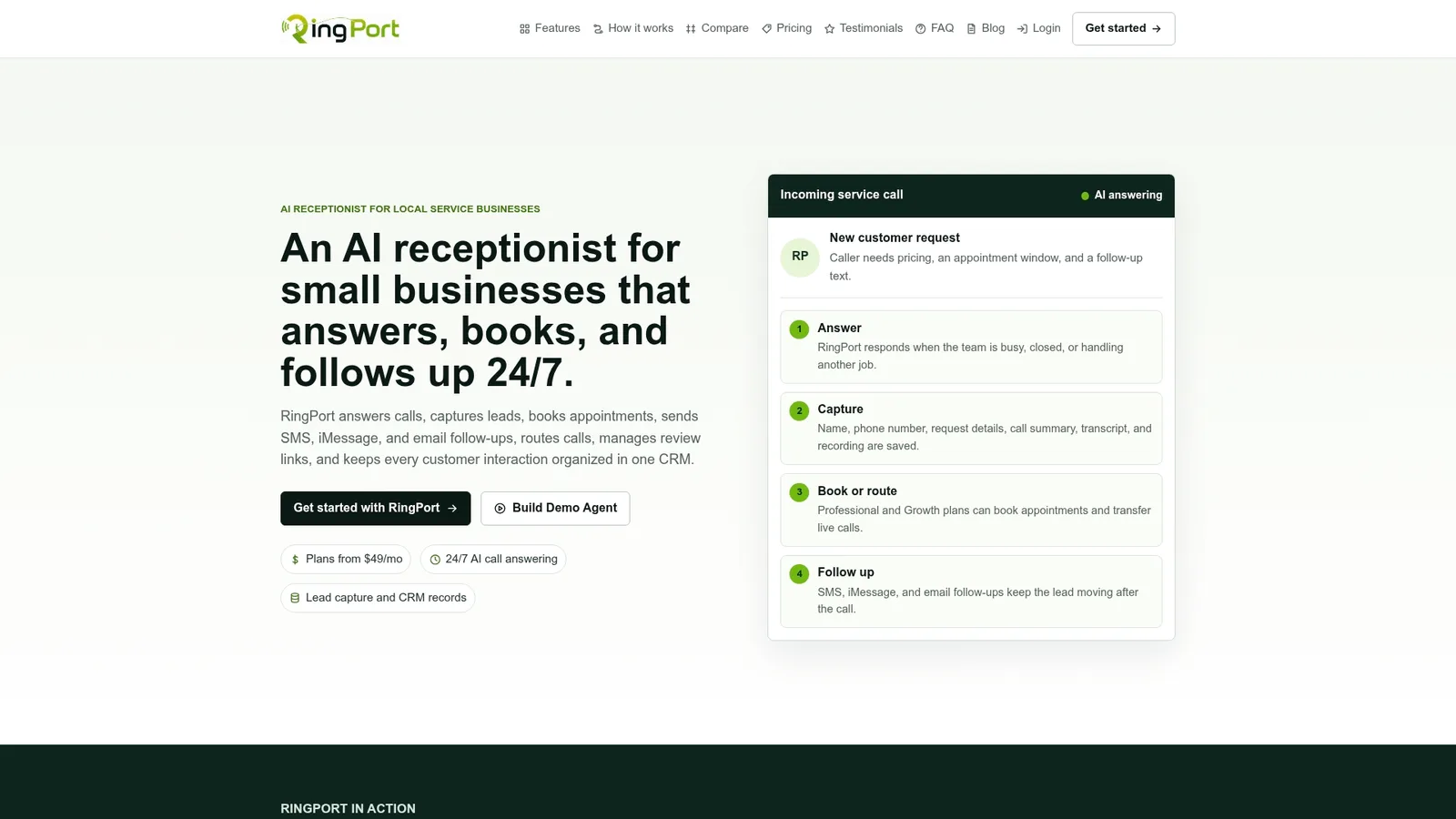
RingPort is the faster path to everything this article just walked through. Instead of stitching together a carrier line, a transcription vendor, and a separate CRM connector, RingPort's Fast Agent answers calls, summarizes them, and pushes CRM-ready output through built-in routing and webhook integrations, no custom integration project required.
Run the same pilot checklist this article recommends: check capture quality on your first batch of calls, confirm contact-matching against your existing customer list, try the one-click approval step on a handful of records, and verify the field mapping lands where your team actually looks for it. If those four checks pass, you have a working call recording summary to CRM pipeline without months of internal engineering. Visit RingPort to start a trial and see how quickly a small service business can get from missed calls to logged, actionable CRM records.
Sources
- NIST: AI Risk Management Framework
- OWASP GenAI Top 10
- Using auto call logs in RingCentral for HubSpot
FAQ
Can AI Actually Summarize Phone Calls Accurately?
Yes, modern AI summarization handles most business calls well, though accuracy depends heavily on transcription quality and diarization. An approval buffer catches the errors that slip through, which is why most well-designed systems include one.
What Is a Call Summary in a CRM Context?
A call summary is a condensed record of a phone conversation, typically including the topic discussed, decisions made, and next steps, saved as an activity or note attached to a contact or deal.
What Role Does a CRM Play in Call-Center Operations?
A CRM centralizes customer interaction history, including call summaries, so reps and managers can see the full context of a relationship without digging through separate call logs or spreadsheets.
What Is the Difference Between CRM and IVR?
A CRM stores and organizes customer relationship data like contact history and deal status, while an interactive voice response (IVR) system routes incoming calls based on caller input before a human or AI even picks up. RingPort combines answering and routing with the summary data that then feeds into a CRM.
Do I Need to Review Every AI Call Summary Before It Syncs?
Not indefinitely. Start with a review-and-approve workflow, then shift high-confidence call types to auto-sync once your pilot shows a consistently low edit rate.