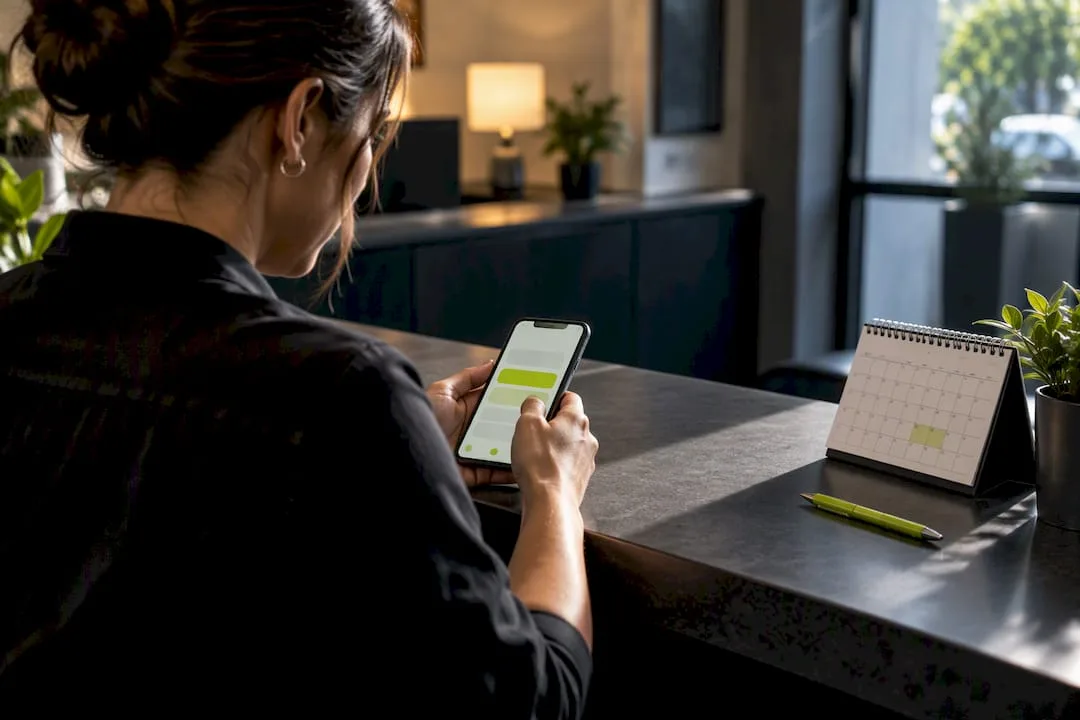
5 Minute Response Playbook: Lead Follow Up Automation for Contractors
Playbook for contractors: automate lead follow up with a 5 minute speed to lead, missed call rescue, and a 5 to 7 touch estimate cadence. Setup, costs,...
How many customers are slipping away before you can answer?
Answer 4 quick questions and get a simple missed-call estimate for your business.
Answer with one tap. Contact details come after your result.
Here is the estimate.
Thanks. Your result was received.
Automating speed-to-lead, missed-call recovery, and a 5- to 7-touch estimate follow-up sequence is the fastest way for a small contractor to convert more leads without hiring staff. Multi-touch cadences convert far better than a single call or text, and responding within minutes dramatically raises your odds of even qualifying a lead. Get those three sequences running, and you'll book more jobs while spending less time chasing people. RingPort builds this kind of contractor lead follow up automation directly into its call and messaging workflows.
TL;DR:
- Responding to leads within five minutes significantly increases the likelihood of qualifying the lead before competitors do.
- Automated missed-call recovery combined with multi-touch follow-up sequences can recover and convert leads that would otherwise be lost.
- A 5- to 7-touch estimate follow-up over approximately two weeks steadily builds trust and increases the chances of booking jobs.
- Setting up automation with reliable triggers, pause-on-reply rules, and lead source tracking costs $149 to $499 monthly, with positive ROI typically within two to four months.
- Ensuring strict compliance with opt-in, opt-out, and fair calling rules is essential to avoid fines and maintain reputation when using automated communication.
Table of Contents
- What Is Contractor Lead Follow Up Automation?
- How Do You Set Up Automated Follow-Up in a Small Shop?
- Which Systems Should Your Automation Connect To?
- What Does It Cost, and How Fast Is the Payback?
- What Compliance Rules Apply to Automated Follow-Up?
- How RingPort Fits This Playbook
- Balancing Automation With Real Sales Work
- Get Your Follow-Up Sequences Running With RingPort
- Sources
- FAQ
What Is Contractor Lead Follow Up Automation?
Contractor lead follow up automation is software that answers, texts, or emails a prospective customer automatically, based on triggers like a missed call, a submitted form, or a stalled estimate, so no lead sits untouched. It's the practical answer to a problem every contractor knows: leads arrive at 9 PM on a Saturday, or while you're forty feet up a ladder, and by the time you call back, three other contractors already have.
This is where "lead management software" and "contractor CRM tools" come in as the umbrella terms you'll see in software marketing. Whatever you call it, the job is the same: acknowledge the lead instantly, keep nudging until they book or clearly say no, and rescue the calls you physically couldn't answer. The sequences below are the ones that matter most, in the order they matter.
Speed-to-lead comes first, and the window is tighter than you think
Speed-to-lead means the elapsed time between a lead coming in and your business making first contact. Set a service-level target of five minutes for that first touch, whether it's an automated text acknowledgment or a live callback attempt. That number isn't arbitrary. Contractors who respond within five minutes are far more likely to qualify a lead at all, because homeowners requesting estimates are usually contacting two or three companies at once, and the first one to answer often gets the appointment.
An automated text that says "Thanks for reaching out about your roof repair, we'll call within the hour" does more work than most people expect. It stops the lead from calling the next name on their list, and it buys your team time to call back properly instead of scrambling.
Missed-call recovery turns a lost ring into a booked estimate
Every unanswered call is a lead walking toward a competitor. The standard fix is a two-step pattern: the moment a call goes unanswered, an automated text goes out ("Sorry we missed you, want to grab a time for an estimate?"), and any voicemail left gets transcribed to text so your team can read it instead of dialing into a mailbox between jobs. This single flow recovers business that would otherwise vanish without you ever knowing it existed.
Estimate follow-up needs a real cadence, not one callback
A lead who requested an estimate and went quiet isn't necessarily a lost cause. Contractors commonly run five to seven touches over roughly fourteen days, and a workable version looks like this:
- Day 0: Confirmation text plus the estimate summary or a scheduling link.
- Day 1: A short check-in call or text asking if they had questions about scope or pricing.
- Day 3: An email that reinforces value, maybe a photo of similar completed work.
- Day 7: A direct nudge with urgency, such as seasonal scheduling or material lead times.
- Day 14: A final "still interested?" message that gives them an easy yes or no.
Each touch has a different job. Early messages build trust; later ones create a reason to decide now.
Appointment reminders stop the no-show bleed
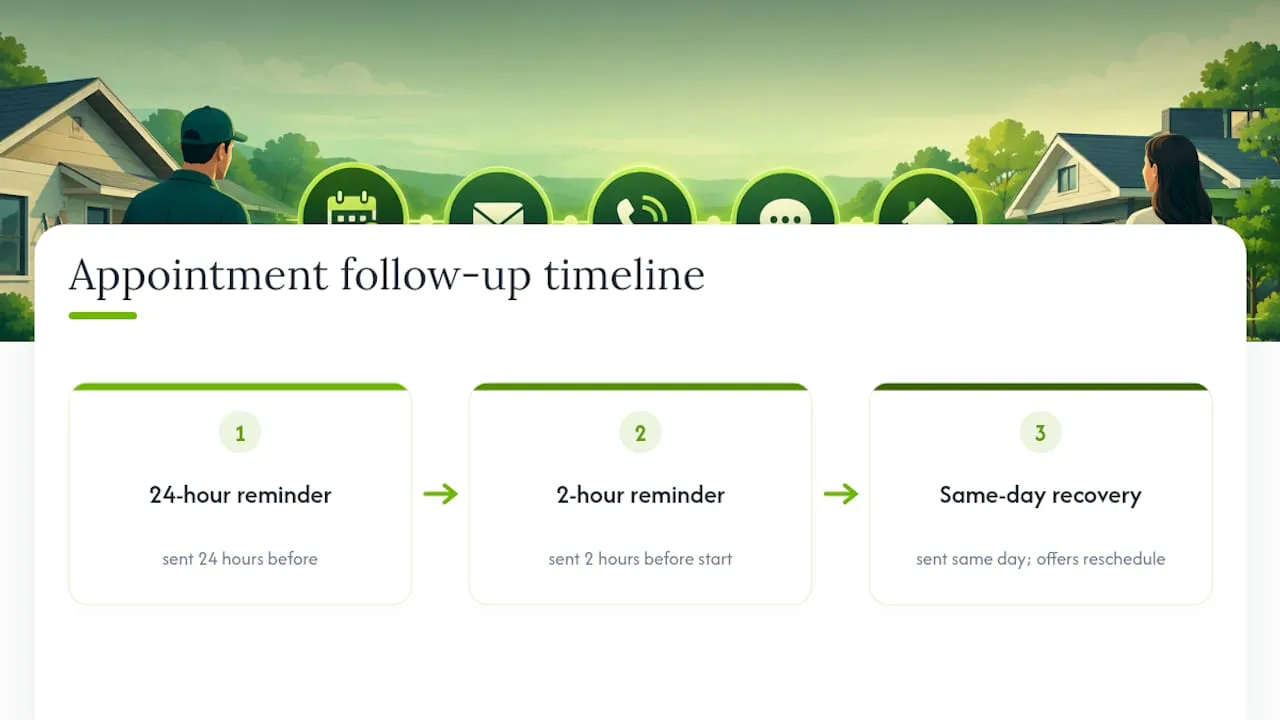
Automated reminders sent 24 hours and again 2 hours before a scheduled estimate or job start cut down on wasted drive time. If a customer no-shows anyway, an automated recovery message the same day, offering to reschedule, recovers a meaningful share of those appointments without anyone on your team having to remember to follow up.
Reactivation brings dormant leads back to life
Not every lead converts on the first pass, but plenty of "not right now" leads become "actually, let's do it" leads months later. A reactivation cadence at 30, 90, 180, and 365 days keeps your business top of mind:
- 30 days: A light check-in, no pressure, just "still thinking about that project?"
- 90 days: Seasonal relevance, like gutter cleaning before fall or AC tune-ups before summer.
- 180 days: A value-add message, maybe a tip or a referral offer.
- 365 days: A fresh estimate offer, since prices and availability have likely changed.
This is what most contractors describe when they talk about "lead nurturing strategies," and it's the piece that gets skipped most often because it requires patience most owners don't have time for manually.
How Do You Set Up Automated Follow-Up in a Small Shop?
You don't need a marketing department to run this. You need a clear map of where leads come from, a handful of trigger rules, and a short pilot before you scale it across your whole business.
-
Inventory your lead sources. Most contractors get leads from phone calls, a website contact form, and maybe a lead-generation site. Pick your two highest-volume sources first, usually phone calls and web forms, since those are where automation delivers the fastest wins.
-
Design simple triggers and branches. Keep the logic plain: if a web form is submitted, send an intro text and create a callback task for your team. If a call goes unanswered, send a text-back message and transcribe the voicemail. You don't need complex branching on day one, just reliable triggers that fire every time.
-
Set pause-on-reply rules before you launch anything. The moment a lead replies, books, or opts out, the sequence must stop automatically. Deal-context-aware automation pauses the moment someone responds instead of continuing to blast messages at someone who's already engaged. Skipping this step is the single fastest way to annoy a good lead into ghosting you.
-
Cap contact frequency. Set a hard limit, such as no more than one text and one call attempt per day per lead, so your automation never feels like harassment.
-
Run a 7 to 14 day pilot on your two chosen sources. A short, focused pilot reveals the automation's real impact without requiring expensive integration work upfront. Track three numbers during the pilot: average lead response time, reply rate, and booked-job rate.
-
Write templates once, then reuse them. Draft your speed-to-lead text, missed-call text-back, and estimate follow-up messages ahead of time. Keep them short, specific to the trade, and easy to personalize with a name or job type.
-
Set staff handoff rules. Decide exactly when automation stops and a human takes over, usually the moment a lead asks a pricing question or requests a specific appointment time.
Pro Tip: Run your pilot on your slowest lead-volume week, not your busiest. You'll catch template and trigger mistakes without the pressure of missing real revenue while you fix them.
Once your pilot shows improvement in response time and booked-job rate, expand the same logic to your other lead sources, like referrals or a lead-generation service, using the templates and rules you already tested.
Which Systems Should Your Automation Connect To?
Automation only works when your lead data lives in one place. The moment you're checking three different inboxes and a separate spreadsheet to find a lead's history, you've built what the industry calls automation bloat, a pile of disconnected tools that each do one thing but never talk to each other.
The essential pieces to connect are:
- Telephony or an AI receptionist that answers calls, captures details, and logs them automatically.
- A CRM or contact database that holds every lead's full history, not just their name and number.
- A calendar or scheduling tool so booked estimates and jobs sync without manual entry.
- Form capture on your website that feeds directly into the same system as your calls.
- An integration layer like Zapier to connect tools that don't talk to each other natively.
Native integrations beat fragile point-to-point APIs because they're built and maintained by the vendor, not glued together by a third-party workaround that can break silently. When native integration isn't available, build in a fallback, such as an email notification, so a broken connection doesn't mean a lost lead.
At intake, capture the fields that actually help you route and prioritize: job type, estimated project value, preferred contact method, and general availability. That handful of fields lets your system flag a $15,000 kitchen remodel differently than a $200 faucet repair, without you having to sort leads by hand every morning.
Two-way SMS and call handling matter here too. If a lead can only receive messages but can't reply into the same thread your team sees, you've recreated the disconnected-tool problem you were trying to avoid. The goal is a single, centralized timeline for every lead: every call, text, email, and note in one scrollable record. The core purpose of sales automation is freeing your team to focus on the conversations that actually close jobs, not making them jump between five apps.
What Does It Cost, and How Fast Is the Payback?
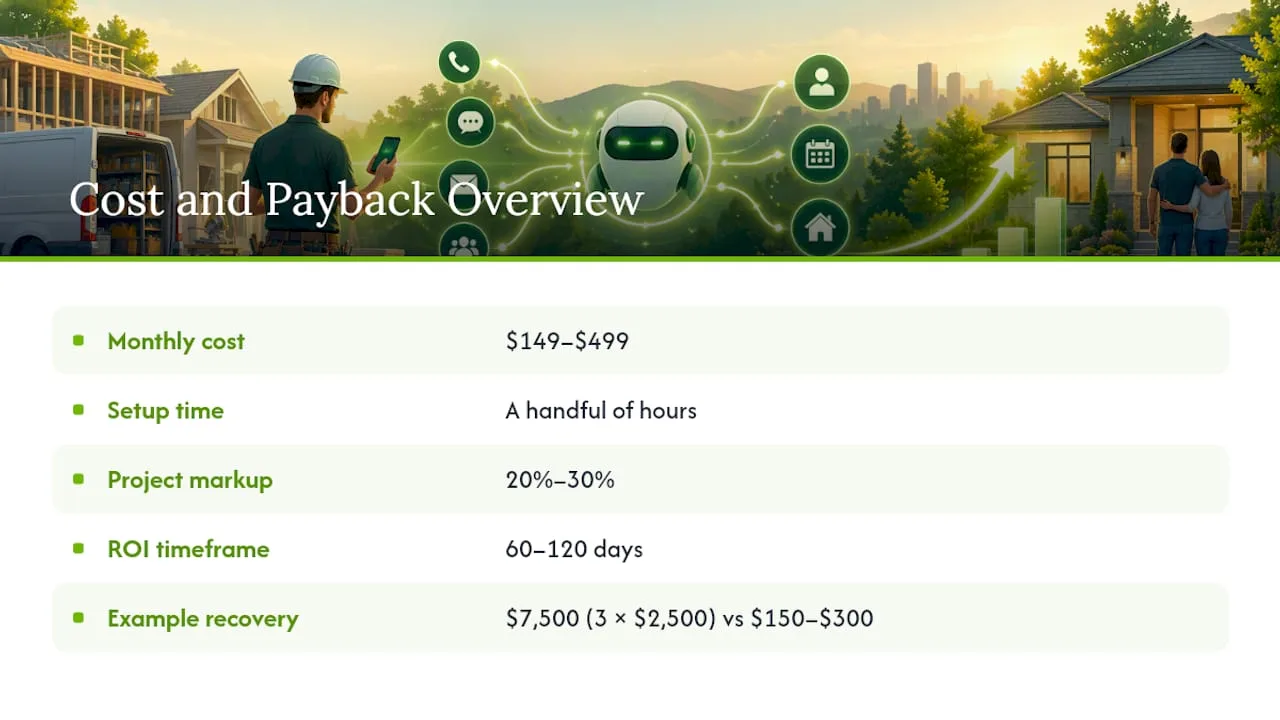
Small contractor shops typically spend $149 to $499 per month on lead follow-up automation, with the higher end reflecting more SMS volume, more integrations, or added onboarding support. Setup usually takes a handful of hours for a solo owner working through templates and triggers, or less if a consultant or admin staffer handles the configuration.
Well-run general contractors typically apply a project markup between 20% and 30%, and overhead for small firms usually consumes a moderate portion of revenue. Automation spend fits inside that overhead line, and it's one of the few overhead costs that directly increases booked revenue instead of just supporting it.
Statistic Callout: Shops that implement structured follow-up automation commonly see positive ROI within 60 to 120 days, with setup time as the main upfront cost rather than the software itself.
Here's a simple way to run the math for your own business. If your average job is worth $2,500 and you recover just three previously lost leads a month through missed-call rescue and better follow-up, that's an extra $7,500 in monthly revenue against a software cost of $150 to $300.
These figures are illustrative planning scenarios, not guarantees, but they show why even modest recovery rates justify the monthly cost quickly. Payback for most shops lands well inside a single billing cycle once the sequences are actually running.
What Compliance Rules Apply to Automated Follow-Up?
Automating texts, calls, and emails means you're now operating under real regulatory guardrails, not just best practices. Getting this wrong risks fines and complaints, so build these checks into your pilot from day one rather than bolting them on later.
- Record and preserve opt-in evidence. When a lead requests an estimate through your form or a call, document how and when they gave contact permission, since TCPA risk around SMS and calls makes this documentation your best protection if a complaint ever surfaces.
- Include a working unsubscribe link in every email. CAN-SPAM requires it, and you must honor opt-out requests promptly, not on your own schedule.
- Build automated opt-out processing for SMS too. A lead who texts "STOP" should be removed from every future sequence automatically, not just the one they replied to.
- Avoid autodialing numbers on the Do Not Call registry unless an established business relationship applies, and document that relationship when you rely on it.
- Stay responsible for your vendors. Businesses remain accountable for messages sent on their behalf, even by automation software, so review what your platform sends before it goes live.
Statistic Callout: CAN-SPAM enforcement specifically targets missing unsubscribe options and delayed opt-out honoring, two mistakes that automated sequences make easy to overlook if pause-on-reply and opt-out logic aren't configured correctly.
Add a compliance checkpoint to your pilot test: before scaling any sequence, confirm opt-outs process automatically and every email includes a working unsubscribe link.
How RingPort Fits This Playbook
RingPort builds the sequences described above directly into its call and messaging workflows, so you're not stitching together five separate tools to run one lead through its full lifecycle.
- Instant text plus booking fires the moment a call comes in or a form is submitted, covering the speed-to-lead requirement without a manual step.
- Missed-call text-back automatically follows up on any call your team couldn't answer, paired with voicemail transcription so nothing sits unread in a mailbox.
- Appointment reminders reduce no-shows using the same 24-hour and 2-hour pattern described earlier in this guide.
- Review automation extends the same follow-up logic past the job's completion, prompting satisfied customers at the right moment.
For setup guidance on specific pieces of this system, RingPort's own guides walk through the details: missed-call text-back setup, appointment reminder templates, and speed-to-lead SLA design. If your team also manages field scheduling and crew availability, a tool like Clock-Me can help verify who's actually available before an automated booking confirms a time slot.
Balancing Automation With Real Sales Work
Automation earns its keep on the routine chase, the fifth reminder text, the missed-call rescue at 9 PM, the reactivation nudge at day 180. None of that requires your judgment. Where it goes wrong is when contractors try to automate the actual sales conversation, the moment a homeowner asks a pricing question or wants to negotiate scope. That's still a human job, and pretending otherwise costs you the close.
The most common failure I see isn't too little automation, it's automation bloat: five tools that don't share data, no pause-on-reply logic, and templates that read like a robot wrote them because one did, without a human ever reviewing the tone. Fix the pause-on-reply issue first. It's the difference between a system that feels attentive and one that feels like spam.
Track three numbers for your first 90 days: average response time, reply rate, and booked-job rate. If response time doesn't drop and booked-job rate doesn't climb within that window, the sequences need editing, not more volume.
— Serhii
Get Your Follow-Up Sequences Running With RingPort
RingPort turns everything in this playbook into a working system instead of a stack of manual tasks, giving you 24/7 call capture, automatic missed-call recovery, and multi-channel follow-up without hiring a receptionist to manage it. Where a generic CRM leaves you to build triggers and templates from scratch, RingPort ships with the speed-to-lead, missed-call rescue, and reminder sequences already structured for service businesses.
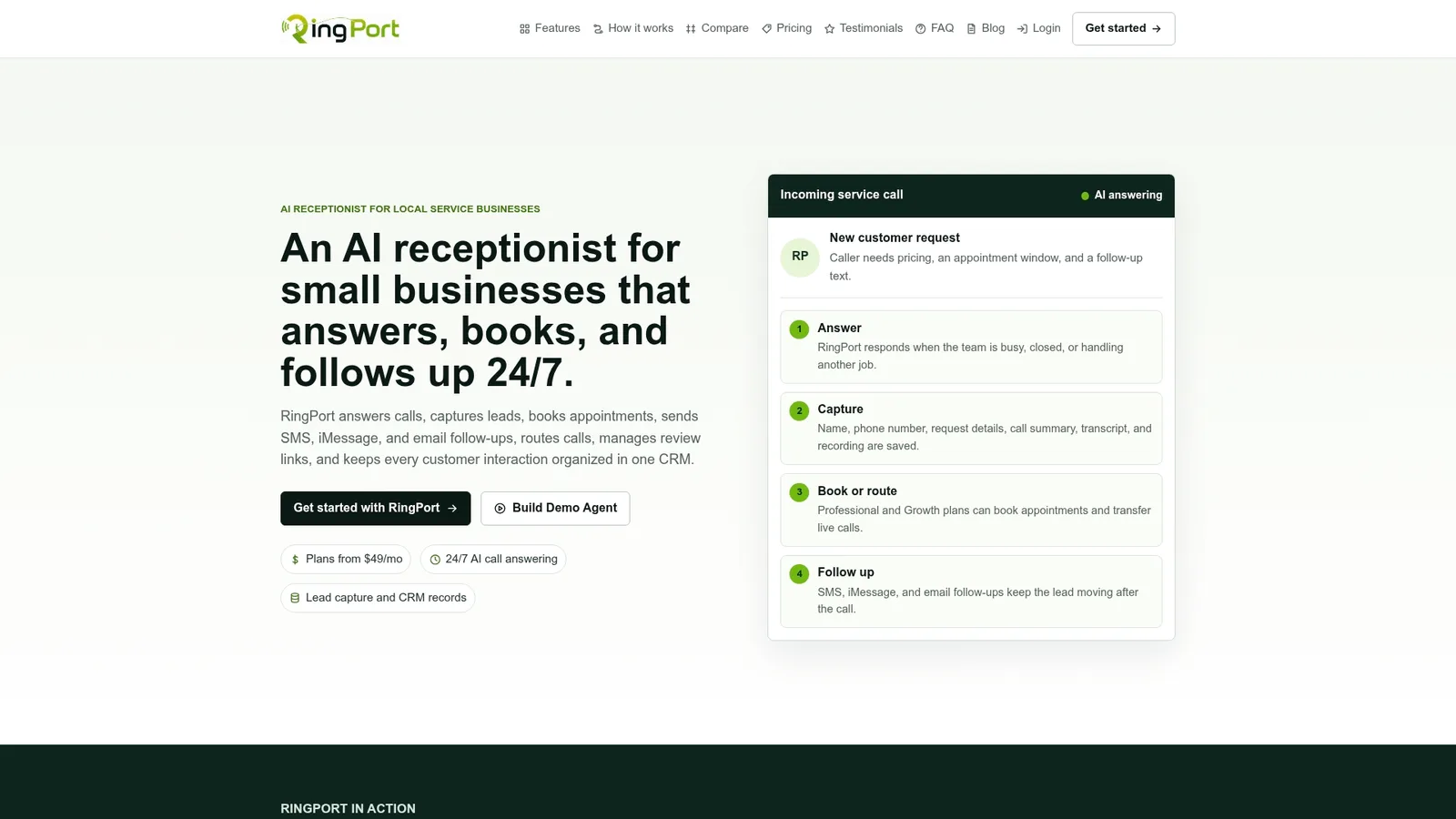
Most contractors get their first automated sequences live within days, and the early signal to watch for is a drop in average response time alongside a rise in booked estimates over the following 30 to 90 days. Plans start with Starter, scale to higher tiers as call and messaging volume grows, and pay-as-you-go add-ons cover extra minutes or SMS credits when you need them. If you want to see the higher-touch version of this in action first, the RingPort Fast Agent demo walks through a live example before you commit to a plan.
Sources
- Marketing automation for contractors - PipelineOn
- CAN-SPAM Act: A compliance guide for business | FTC
- What is sales automation? | HubSpot
- Monday
FAQ
How much do contractors pay for leads?
Cost per lead varies widely by trade and source, but what matters more is your close rate once a lead arrives. Automating speed-to-lead and follow-up sequences increases the value of every lead you already pay for by converting more of them into booked jobs instead of raising your acquisition spend.
How often should you follow up with a contractor lead?
A 5 to 7 touch sequence over about 14 days converts far better than a single callback attempt. Space touches out with different intents: confirmation, check-in, value reminder, urgency, and a final yes-or-no message.
What is the best way for a contractor to get leads?
Generating leads matters less than what happens in the minutes and days after they arrive. Responding within five minutes and running a structured follow-up sequence, the kind RingPort automates through instant text and missed-call recovery, converts significantly more of the leads you're already generating.
What is a lead automation system?
A lead automation system is software that triggers texts, calls, or emails automatically based on lead behavior, like a missed call, a form submission, or days of silence after an estimate. It replaces manual follow-up with consistent, rule-based sequences that pause the moment a lead replies or books.