
Stop Losing 27% of Callers: IVR vs Receptionist for Small Businesses
Decide whether IVR, a live receptionist, or an AI receptionist best protects bookings and revenue for small service businesses. Learn how 27% abandonment...

How many customers are slipping away before you can answer?
Answer 4 quick questions and get a simple missed-call estimate for your business.
Answer with one tap. Contact details come after your result.
Here is the estimate.
Thanks. Your result was received.
Most small service businesses that live on bookings do better with an AI receptionist than a classic IVR menu, because it resolves calls instead of just routing them. IVR still wins when call volume is huge and predictable, or when a live person needs to weigh judgment calls. The trade-off boils down to this: IVR is cheaper to run but loses more callers along the way, while conversational systems cost more per month yet capture bookings you'd otherwise miss.
TL;DR:
- IVR systems are cost-effective but risk high abandonment rates as menu depth increases, leading to lost calls and revenue.
- AI receptionists require higher setup and monthly costs but significantly reduce missed bookings by resolving diverse caller requests in real time.
- Hybrid systems combining AI and IVR offer a safe way to transition, starting with after-hours or overflow calls to measure performance before full deployment.
- Growing businesses benefit more from AI receptionists due to scalable setup and the ability to handle unpredictable, varied call types without extensive staffing increases.
- Security and privacy protocols should be carefully evaluated, especially for AI systems processing sensitive data, to ensure compliance with industry regulations.
Table of Contents
- IVR vs Receptionist: A Quick Comparison
- How Do IVR and AI Receptionists Handle the Same Call Differently?
- What Does Each Option Cost to Set Up and Maintain?
- How Should You Choose Between IVR, a Receptionist, or AI?
- Can You Combine IVR and AI Receptionist Coverage?
- Where RingPort Fits the Decision Criteria
- What Happens During Onboarding, and Which Systems Need to Connect?
- Which Business Types Actually Benefit From Each Approach?
- Does Call Handling Method Actually Change Customer Satisfaction?
- How Do These Options Scale as a Business Grows?
- What Security and Privacy Risks Come With Each Call Method?
- The Real Trade-Off Nobody Puts on the Comparison Chart
- Ready to Stop Losing Calls After Hours?
- Sources
IVR vs Receptionist: A Quick Comparison
Here's how the three main options stack up before you dig into the mechanics.
- IVR (Interactive Voice Response): A menu system that routes calls by keypad or basic voice prompts. Cheap to run, but abandonment climbs fast as menus get deeper. Best for high-volume, predictable call types like appointment confirmations or bill payment lines.
- Live or virtual receptionist: A real person (in-house or outsourced) who answers, books, and uses judgment on the fly. Best strength is human nuance; biggest limitation is cost and availability outside business hours.
- AI receptionist: Software using natural language understanding that answers, books, and follows up without a human on the line. Strongest at 24/7 coverage and end-to-end task completion; the trade-off is a learning curve during setup and monthly software cost.
If your business profile is a single location with simple, repeatable requests, IVR or a virtual receptionist vs IVR hybrid can work. If callers ask varied questions and expect same-call booking, an AI receptionist for small business use closes more of those calls than routing-only systems ever will.
How Do IVR and AI Receptionists Handle the Same Call Differently?
An IVR call follows a fixed decision tree: press 1 for hours, press 2 for billing, press 3 to book. It never deviates from the script, which makes it predictable but brittle. A caller with an off-menu question, "Can you fit me in Thursday afternoon instead of the morning slot you offered?", has nowhere to go except a dead end or a transfer to voicemail.
An AI receptionist, by contrast, uses natural language understanding parsing what the caller actually wants and often resolves the request in that same call, whether that's booking, answering a policy question, or taking a detailed message. This is the core mechanical difference behind receptionist tasks vs IVR comparisons: one routes, the other resolves.
A live or virtual receptionist handles the same call with full human judgment, which is why judgment-heavy industries (legal intake, urgent medical triage) still lean on people. But humans aren't on the line at 2 a.m., and that's where missed bookings pile up.
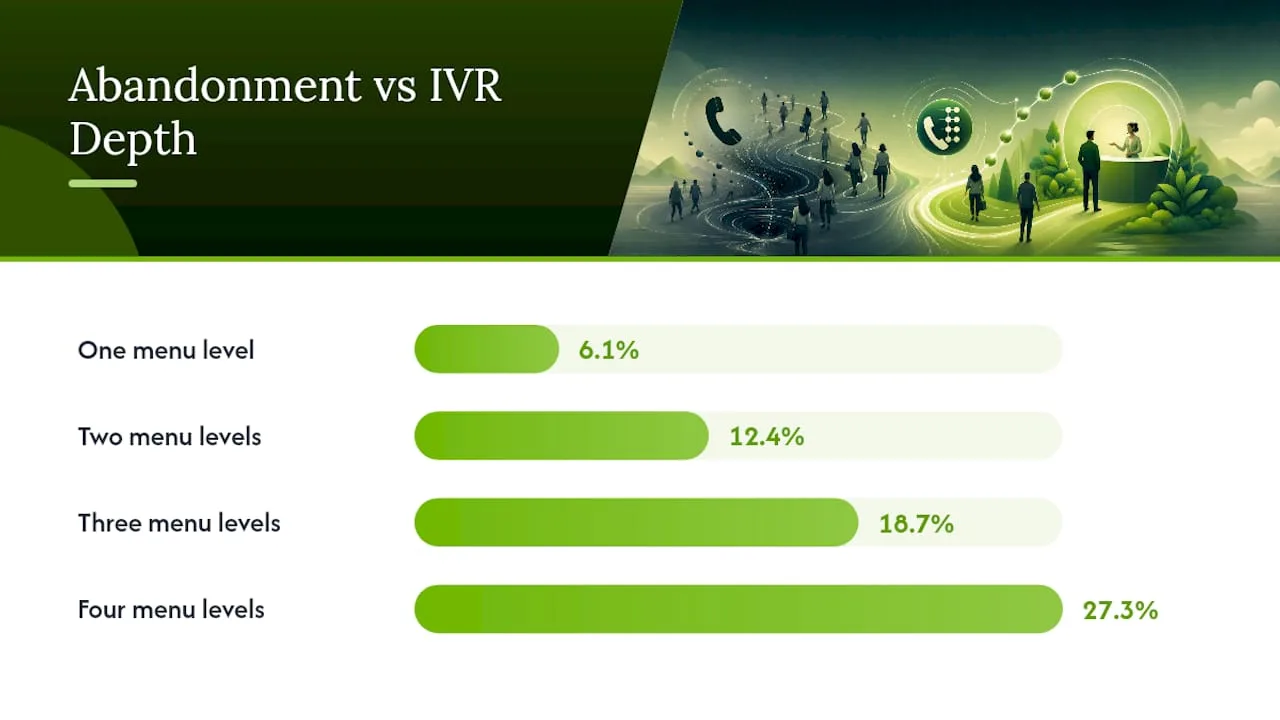
The cost of getting this wrong is measurable. Abandonment rates climb sharply as IVR menu depth increases: 6.1% of callers hang up at one menu level, but that jumps to 12.4% at two levels, 18.7% at three, and 27.3% once a caller has to navigate four layers of prompts. Every one of those hang-ups is a caller who needed something and didn't get it. For a business booking $150 service calls, a 27% abandonment rate on a busy line isn't a UX footnote. It's lost revenue walking out the door one ring at a time.
What Does Each Option Cost to Set Up and Maintain?
Sticker price only tells part of the story. The real comparison is total cost of ownership, including the hours someone spends babysitting the system after launch.
- IVR: Low upfront cost, but someone has to script the menu tree, record prompts, and update it every time services or hours change. Left untouched, an outdated IVR quietly routes callers to dead ends for months.
- Live receptionist (in-house): Highest fixed cost, salary plus benefits, and no after-hours coverage unless you pay for a second shift or an answering service.
- Virtual/outsourced receptionist: Typically runs $300 to $800 a month depending on call volume, according to industry cost comparisons, with limited ability to book directly into your systems.
- AI receptionist: Setup involves training the system on your services, hours, and pricing, then connecting it to your booking calendar. Monthly plans often run in the low hundreds, which compares favorably against traditional answering service pricing once you factor in what it actually completes on the call.
The hidden costs matter more than the sticker price. IVR maintenance eats staff time nobody budgets for. A detailed cost breakdown shows how these categories compare when you include setup labor, not just the monthly line item. Missed bookings from either weak option are the biggest hidden cost of all, and they never show up on an invoice.
How Should You Choose Between IVR, a Receptionist, or AI?
Choosing between IVR and receptionist options gets easier once you rank your business against a few concrete factors instead of guessing.
- Estimate your call volume and revenue per call. A plumber booking $400 jobs loses more per missed call than a retail store answering "are you open" questions.
- Map call complexity. If most calls are one of three predictable requests, IVR handles it fine. If requests vary widely, natural language handling wins.
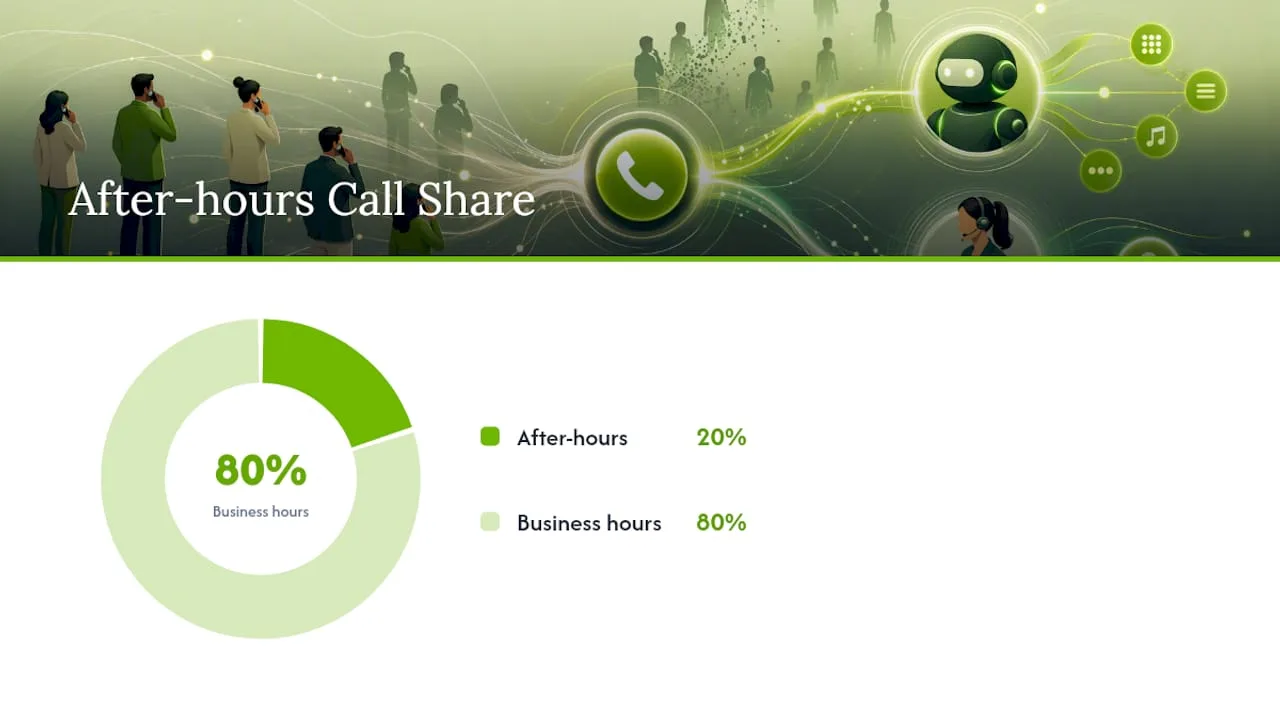
- Check your after-hours gap. If 20% or more of your calls come in outside business hours, neither classic IVR nor a live receptionist covers that window without added cost.
- Assess your technical bandwidth. AI receptionist setup takes some configuration time; teams with zero spare hours should ask vendors about guided onboarding before committing.
- Match the outcome to your profile. A single-location salon with steady, simple requests can lean on a virtual receptionist. A multi-location HVAC company with unpredictable call types benefits most from an AI receptionist for small business needs. A legal or medical practice with judgment-heavy intake still needs a human on some lines.
When vetting vendors, ask directly: What happens when the system doesn't understand a request? Can it actually book into my calendar, or just take a message? What's the fallback if the AI goes down? A vendor who can't answer the fallback question clearly is a red flag.
Pro Tip: Pull your call logs for one week and count how many calls come in after hours or on weekends. That number alone usually settles the debate.
Can You Combine IVR and AI Receptionist Coverage?
You don't have to rip out your phone system to modernize it. A common hybrid pattern uses an AI front door for most calls, with IVR-style routing kept in reserve for complex enterprise transfers or multi-department switchboards. This pairing works well for multi-location practices that still need structured routing at scale.
Migrating safely follows a simple sequence: pilot conversational handling on your after-hours or overflow line first, measure bookings and abandonment before rolling it out further, and keep an IVR fallback configured for edge cases. This staged approach limits risk while you confirm the system performs.
- Start with overflow or after-hours calls only.
- Track booking completion and abandonment for two to three weeks.
- Expand to full-time coverage once numbers hold steady.
- Keep a documented fallback path for complex transfers.
Pro Tip: Never switch your main line over on day one. Run the pilot quietly for a few weeks so you catch edge cases before customers do.
Where RingPort Fits the Decision Criteria
RingPort was built around the exact gap this comparison exposes: calls that come in when nobody's at the desk. Its AI receptionist platform answers around the clock, uses smart routing to send calls where they need to go, and connects directly to booking calendars so a call turns into an appointment without a human touching it.
Some local service businesses report smoother booking flows and better lead capture, particularly on after-hours and overflow calls that used to go to voicemail. That outcome tracks with the broader pattern this article covers: systems that resolve calls beat systems that only route them.
[Author background and first-party case study details to be added.]
What Happens During Onboarding, and Which Systems Need to Connect?
Setup timelines vary more by integration complexity than by the technology itself. A basic IVR can go live in a day or two once someone scripts the menu and records the prompts, but every future change (new hours, new service line) means re-recording and re-testing.
AI receptionist onboarding typically takes longer upfront because the system needs training on your specific business: service list, pricing, hours, and common questions. Most of that work happens in the first week. The bigger factor is what it connects to. A booking calendar integration (Google Calendar, Calendly, or a practice management system) lets the receptionist confirm real-time availability instead of taking a message and hoping someone follows up. CRM integration matters just as much, since it determines whether a captured lead actually lands somewhere your team can act on it, rather than sitting in a call log nobody checks.
For businesses running property management or medical scheduling software, ask any vendor directly whether their system integrates with your specific platform before signing anything. A system that "can take messages" but doesn't talk to your calendar or CRM just becomes a fancier voicemail. The setup guide for automated call answering walks through the integration questions worth asking before you commit to any platform.
Which Business Types Actually Benefit From Each Approach?
A single dentist's office with steady, predictable call patterns, confirmations, reschedules, insurance questions, often does fine with a well-scripted IVR or a shared virtual receptionist, since the requests rarely stray from a short list.
Home service businesses tell a different story. A plumbing or HVAC company fielding emergency calls at all hours loses real revenue when a caller hits a dead-end menu at 9 p.m. and calls a competitor instead. These businesses see the clearest gain from AI receptionist for small business setups, since the calls are urgent, varied, and often worth hundreds of dollars each.
Multi-location salons and medical offices sit in the middle. Call volume is high enough that pure human staffing gets expensive fast, but requests are varied enough that rigid IVR menus frustrate callers. This is where the smart call routing approach, blending automated intake with intelligent handoff, tends to outperform either extreme on its own.
Property management firms juggling maintenance requests across dozens of units represent maybe the starkest case: call volume is unpredictable, requests range from trivial to urgent, and missing a burst pipe call at midnight has real consequences. That combination of unpredictability and stakes is exactly where routing-only systems fall short most visibly.
Does Call Handling Method Actually Change Customer Satisfaction?
Yes, and the mechanism is simpler than most owners assume: satisfaction tracks caller effort, not caller patience. A menu with clear options at one level barely dents satisfaction. Force the same caller through four nested layers, and frustration compounds with each additional decision point, which is why abandonment rises in lockstep with menu depth.
Conversational systems change the effort equation because callers speak naturally instead of translating their need into a menu option. Someone doesn't have to guess whether their question falls under "billing" or "general inquiry." They just ask, and either a human or an AI receptionist figures out the routing from context.
That said, IVR isn't inherently a bad experience. A short, well-designed menu with a fast path to a live person still performs well for routine, high-volume requests, especially when callers already know what they need. The failure mode is depth and ambiguity, not the format itself. Auto attendant vs receptionist comparisons often miss this nuance: a basic auto attendant that quickly connects callers to the right line beats a bloated menu tree every time, regardless of whether a human or AI sits on the other end.
How Do These Options Scale as a Business Grows?
IVR scales cheaply in terms of hardware and licensing, since adding call volume rarely means adding cost. But it doesn't scale well in complexity. A business that starts with three services and grows to fifteen ends up with an unwieldy menu tree that takes longer to navigate and drives up abandonment right when call volume matters most.
Live and virtual receptionists scale in a straight line: more calls means more staff hours, which means more cost. That's a predictable model, but it caps out fast for a growing business, since payroll doesn't flex downward on a slow week the way software cost does.
AI receptionists tend to scale more gracefully because the marginal cost of handling one more call is close to zero once the system is trained. A business expanding from one location to three doesn't need to re-hire or renegotiate an answering service contract. It needs the system retrained on new hours, new staff, and new services, which is a configuration task rather than a hiring cycle. That's a meaningful advantage for growing service businesses that don't want phone coverage to become a recurring hiring problem every time they add a location or a service line.
What Security and Privacy Risks Come With Each Call Method?
Every call handling method touches customer data, whether that's a phone number, an address, or, in medical and legal contexts, more sensitive details. IVR systems generally carry the smallest data footprint since they mostly route calls without storing much beyond call logs and keypad selections.
Live and virtual receptionists introduce a human element, which means training and access control matter. A receptionist taking down a customer's address or payment details needs clear protocols for what gets written down, where, and who can see it.
AI receptionists process and often store more conversational data, since the system needs a record of what was said to resolve future calls consistently and to hand off context correctly. That makes vendor security practices worth asking about directly: how call recordings are stored, whether data is encrypted, and how long records are retained. For businesses in medical, legal, or financial services, ask any vendor point blank whether their platform supports the specific compliance requirements your industry carries. A vendor who can't answer clearly, or who deflects the question, is worth walking away from regardless of how good the demo looked.
The Real Trade-Off Nobody Puts on the Comparison Chart
Most comparisons treat this as a feature checklist: IVR has X, AI has Y, pick your winner. That framing misses the actual variable that matters, which is revenue at risk per missed call. A dentist's office losing a confirmation call costs almost nothing. A plumber losing an after-hours emergency call can cost hundreds of dollars in a single ring.
The conventional advice, "get whichever system is cheapest to set up", gets this backward. Setup cost is a one-time expense. Missed bookings compound every week you run the wrong system for your call profile. That's the lens worth applying before shopping for vendors: what's actually at stake per call, not what's cheapest per month.
If there's one thing worth prioritizing first, it's instrumenting your current call abandonment and missed-booking rate before switching anything. Most owners guess at this number. Almost none of them measure it. Once you know what a missed call actually costs your business, the IVR vs receptionist question answers itself far faster than any feature comparison ever will.
— Serhii
Ready to Stop Losing Calls After Hours?
If your business runs on bookings, not just information requests, RingPort gives you round-the-clock coverage without hiring a second shift or building out a mess of menu prompts. It answers calls, books directly into your calendar, and routes anything unusual to the right person, all without a caller ever hitting a dead-end menu.
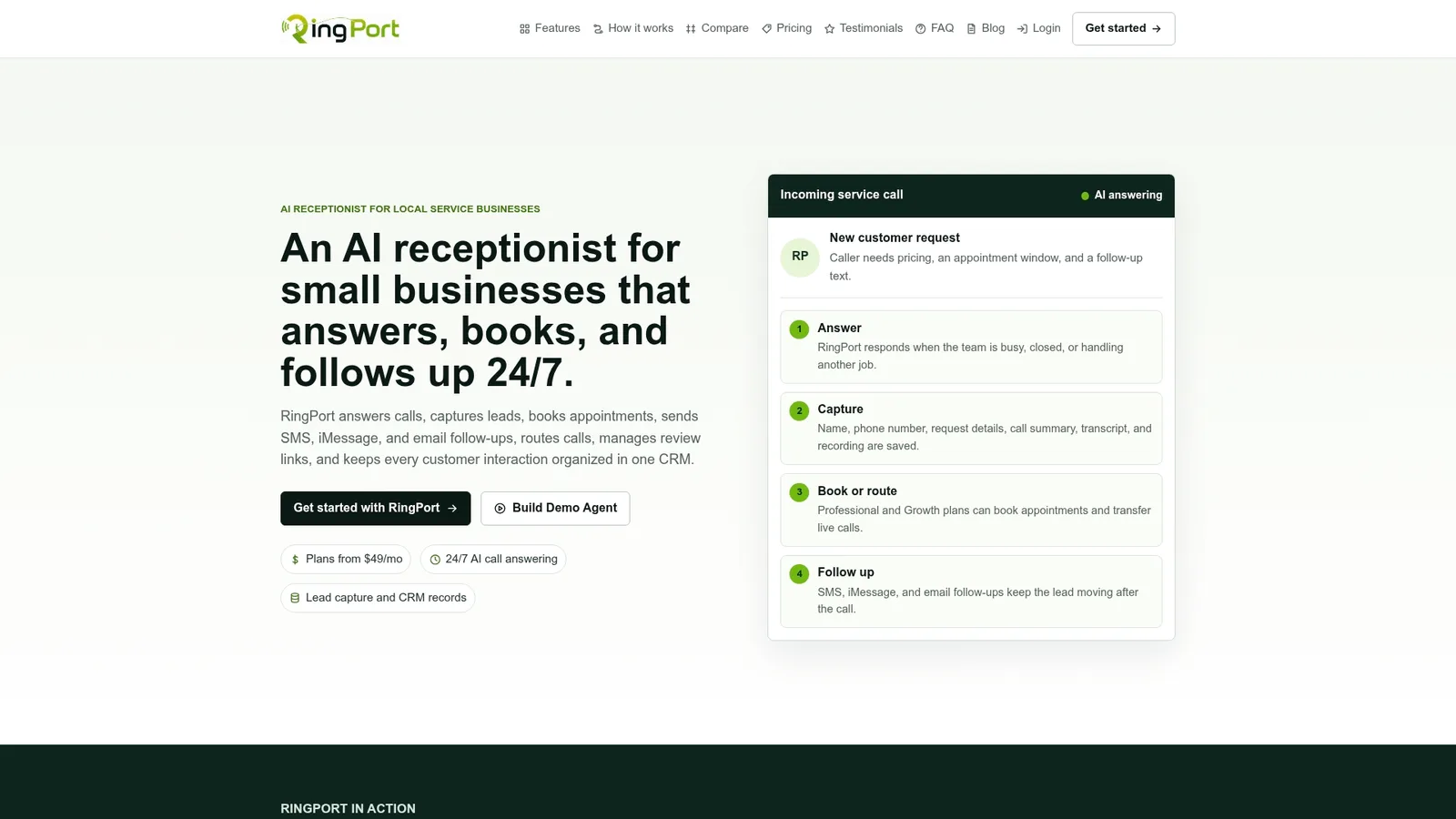
Home service companies, salons, and medical offices use AI receptionist solutions to catch after-hours and overflow calls that used to go to voicemail. If you've read this far because you're losing bookings to missed calls, that's the exact problem RingPort's Fast Agent was built to solve. Start a trial or book a quick walkthrough to see how it handles your actual call types, not a generic demo script, before you decide.
Sources
- AI Receptionist vs IVR: Cost & Call Handling Compared
- AI Receptionist vs IVR: What's the Difference and Which Do You Need?
- What Is IVR (Interactive Voice Response) for Call Centers?