
Launch Receptionist Call Scripts in 4 Weeks for Small Service Teams
Launch receptionist call scripts in four weeks with a practitioner focused plan that sets identity and a confirm then commit booking flow.

How many customers are slipping away before you can answer?
Answer 4 quick questions and get a simple missed-call estimate for your business.
Answer with one tap. Contact details come after your result.
Here is the estimate.
Thanks. Your result was received.
The right receptionist call scripts turn a phone line into a 24/7 booking machine, capturing leads and locking in appointments even at midnight. If you're building or buying one, your first move is deciding your agent's identity and confirming you can connect a live calendar like Google or Outlook. Some platforms offer ready-made setups that let you go from blank prompt to working call flow in days, not months.
TL;DR:
- AI receptionist scripts should include clear booking qualification questions limited to three to five items to maximize completion rates.
- Implement a confirm-then-commit booking pattern with short holds and real-time calendar integration to prevent double bookings and build trust.
- Use a structured system prompt with defined sections for persona, rules, and knowledge base, keeping it under 1,500 words for effective communication.
- During initial rollout, conduct phased testing, especially adversarial calls, and monitor key KPIs like booking rate, escalation rate, and call abandonment.
- Pre-built solutions like Fast Agent can shorten deployment to days, provided the business has calendar access, CRM, and top FAQs prepared.
Table of Contents
- Core Components Every Receptionist Call Script Needs
- How Do You Write the System Prompt and Knowledge Base?
- Calendar, Booking, and CRM: Confirm Before You Commit
- What Does a Four-Week Testing and Launch Plan Look Like?
- Troubleshooting the Failures That Break Caller Trust
- Examples of Receptionist Scripts for Common Call Scenarios
- Legal and Privacy Considerations for Receptionist Scripts
- Training Tips for Staff Using These Scripts
- Metrics and KPIs That Show If Your Script Works
- Why This Approach Works in Production, Not Just in Theory
- Ready to Put These Scripts to Work? Try Fast Agent
- Sources
- FAQ
Core Components Every Receptionist Call Script Needs
Every working script starts with an identity, not a feature list. Give your AI receptionist a name, a tone, and a plain disclosure that it's automated. A greeting like "Thanks for calling Bright Smile Dental, this is Ava, your virtual assistant, how can I help?" does more work than any clever routing logic, because callers relax once they know who (or what) they're talking to.
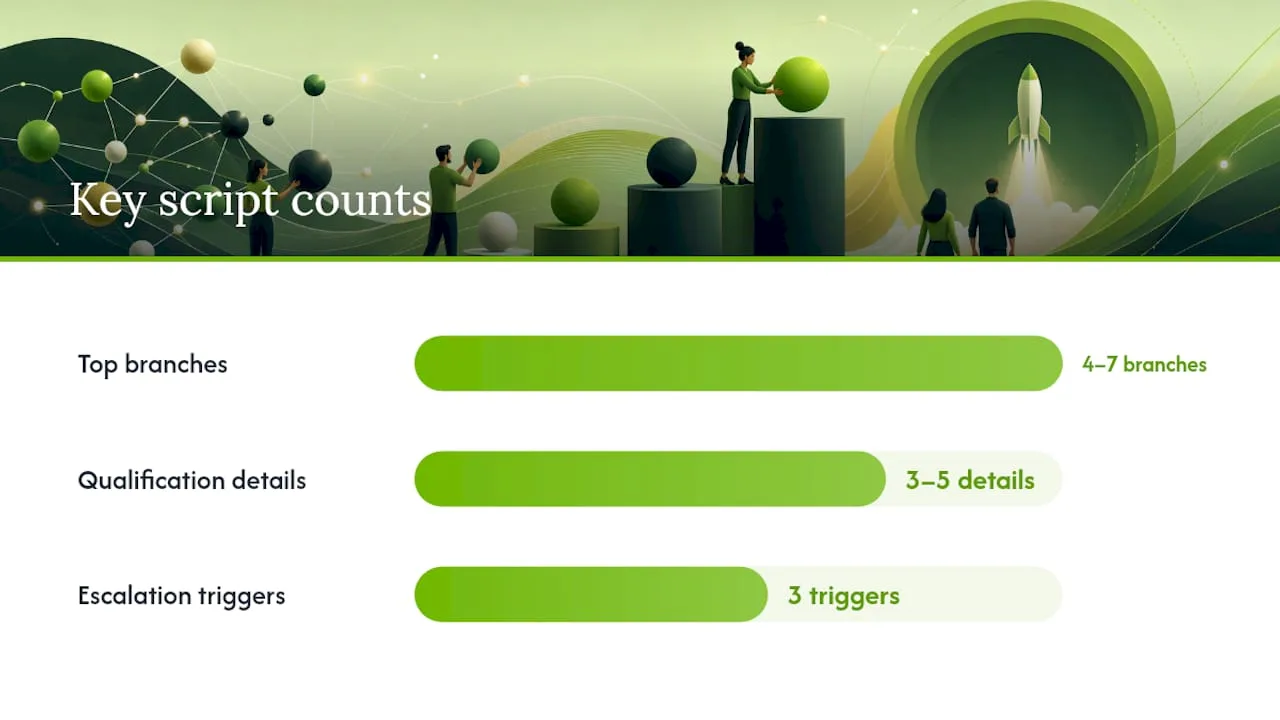
From there, the script branches. Most effective call flows use 4 to 7 top-level branches.
They cover the situations that actually happen on your line:
- Booking a new or existing appointment
- General FAQ (pricing, hours, services)
- Escalation to a live human
- Status check on an existing job or order
- Voicemail or message-taking when nobody's available to transfer to
Inside the booking branch, keep qualification tight. Ask for three to five details maximum, such as service type, preferred date, and callback number, since every extra question chips away at completion rates. Phrase it plainly: "Got it, a drain cleaning. Do mornings or afternoons work better this week?"
Escalation deserves its own rule set. Build explicit triggers, meaning a direct request for a human, detected frustration, or two failed attempts to understand the caller, and route those calls to a live line with a short "whisper summary" playing first, something like "Caller Maria Lopez, needs a refund on a canceled service call." Warm transfers built this way cut repetition and raise satisfaction compared to blind, cold transfers.
Pro Tip: Write your greeting out loud before you type it. If it sounds stiff read aloud, it will sound worse spoken by a synthetic voice.
How Do You Write the System Prompt and Knowledge Base?
A system prompt is the rulebook your AI receptionist follows on every call, and it needs structure, not a wall of instructions. Build it in this order:
- Persona first. Name the agent, set its tone, and write two to three sentences of company facts (what you do, who you serve, your service area). This anchor context keeps every later response consistent.
- Company facts. List the non-negotiables: business hours, service categories, and the phrase to use when something falls outside scope.
- Allowed actions. Spell out exactly what the agent can do: book, reschedule, cancel, quote a price range, or none of those.
- Escalation triggers. Repeat the same rules from your call flow here, in plain language the model can act on.
- Fallback phrasing. Give it an exact sentence for "I don't know," so it never guesses.
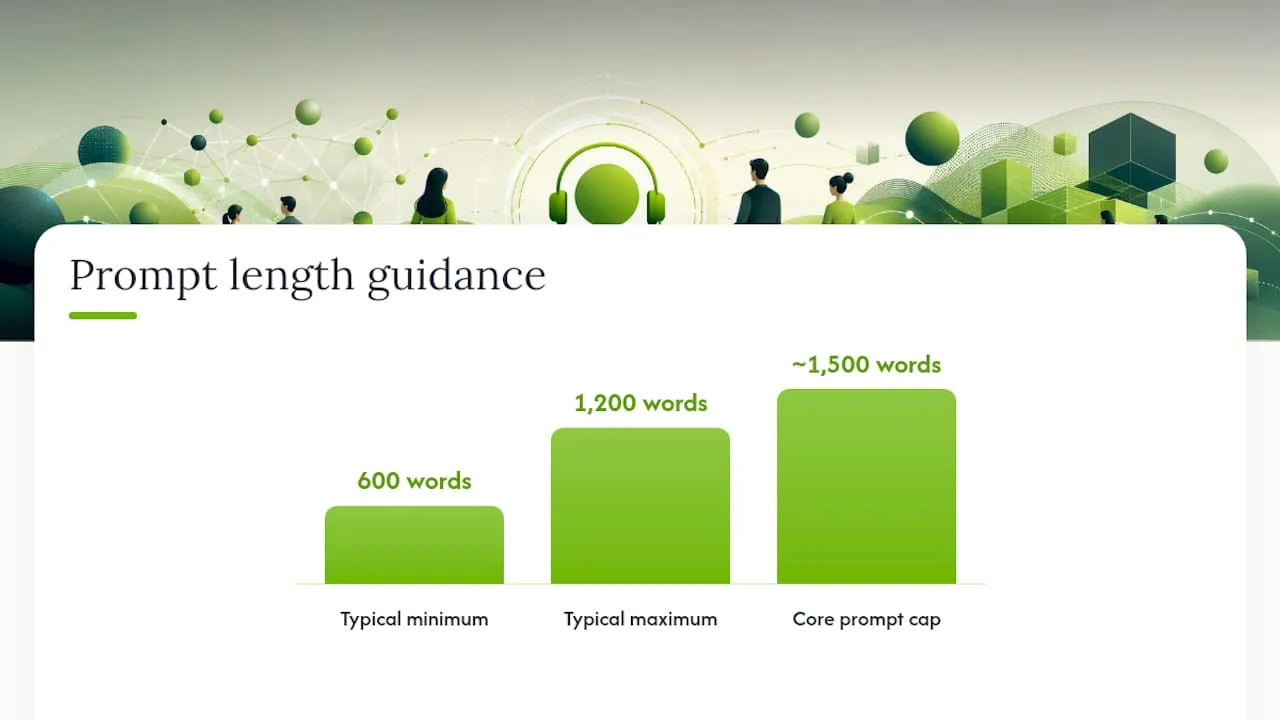
A prompt built this way, with labeled sections for identity, personality, knowledge, greeting, flows, and boundaries, typically runs 600 to 1,200 words; keep the core prompt under roughly 1,500 words and move long FAQ content elsewhere.
That "elsewhere" is your knowledge base, and it works better split by topic rather than dumped into one document. Separate files or sections for pricing, services, hours, and a transfer matrix (who handles what) let the model retrieve the right answer instead of guessing from a pile of mixed content. Keep each answer to a sentence or two.
Finally, use dynamic variables instead of static text wherever the conversation needs personalization. Insert the caller's name, the date of their last visit, or the specific appointment slot being discussed, rather than writing generic placeholders the model has to interpret. For more on structuring instructions the model actually follows, prompt engineering guidance from AmmarAI is worth a read before you finalize your draft.
Calendar, Booking, and CRM: Confirm Before You Commit
Double bookings kill trust faster than almost any other failure, and the fix is a specific sequence: propose, confirm, hold, commit. The agent proposes a time, the caller confirms it verbally, the system places a temporary hold on the calendar, and only then does it commit the booking permanently.
That hold matters. A confirm-then-commit booking pattern with a short temporary hold, typically three to five minutes, gives the system a buffer to finish writing the appointment before another caller (or another instance of the same agent) can grab the same slot. Pair this with an idempotent key tied to the caller and time slot, so a dropped call or retry never creates a duplicate booking.
Your calendar integration needs to be real-time, not batch-synced. Google Calendar and Outlook both support this through their APIs, and without live availability data, your agent will offer slots that are already taken.
On the CRM side, keep the minimum writeback list short but non-negotiable:
- Contact created or updated with name and phone number
- A short call summary, written by the model, logged against that contact
- An intent tag (booked, inquiry, complaint, no-show risk) for reporting
Once the booking commits, your automation hub should fire the remaining tasks: a confirmation text, an internal notification to staff, and any follow-up sequence for no-shows or reminders. Teams that use no-code voice builders with calendar and CRM integrations already in place typically ship a working AI receptionist in two to four weeks, which is a useful benchmark if a vendor quotes you a much longer timeline.
What Does a Four-Week Testing and Launch Plan Look Like?
Treat your rollout like a phased software launch, not a light switch you flip once and forget.
- Week 1: Lock the agent's identity, load answers for your top FAQs, and get a dedicated test phone number live. Call it yourself, repeatedly.
- Week 2: Wire up booking end to end, confirm CRM writebacks are firing correctly, and test that confirmation texts actually arrive.
- Week 3: Run adversarial testing. Throw overlapping speech, angry tones, ambiguous requests, and heavy accents at it. Aim for at least 20 adversarial test calls to surface the failure patterns you haven't thought of.
- Week 4: Move to production call routing, stand up a basic monitoring dashboard, and keep a rollback switch within reach in case something breaks.
During the first two weeks especially, check transcripts daily. Watch for repeated misunderstandings, awkward pauses, and any point where a caller hung up mid-sentence.
Pro Tip: Recruit a few real customers to test the line in week 3 and tell them explicitly to try to break it. They'll find gaps your own team won't think to test.
Troubleshooting the Failures That Break Caller Trust
Most receptionist script failures trace back to a handful of repeatable mistakes, and each has a straightforward fix.
- The agent guesses instead of admitting it doesn't know. Configure a strict fallback phrase and an explicit path to a human callback, so it never invents a price or promises something outside its scope.
- Turns run too long. Keep every response to one or two sentences and ask a single question at a time; shorter turns reduce speech-to-text errors and make interruptions easier to handle gracefully.
- Transfers feel cold and repetitive. Before connecting a caller to a human, play a whisper summary (name, issue, urgency) so your staff doesn't make the caller repeat everything.
- After-hours calls go nowhere. Build a simplified overnight flow that still captures the caller's name, number, and reason for calling, even if full booking isn't offered outside business hours.
Fix these four and you'll eliminate the majority of complaints that show up in early call reviews.
Examples of Receptionist Scripts for Common Call Scenarios
Different calls need different scripts, and trying to force every conversation through one generic flow is where most homegrown attempts fall apart.
Appointment setting: "Thanks for calling Riverside Plumbing, this is Jordan. Are you looking to book a new appointment today?" If yes, the agent qualifies service type, then offers two specific time slots rather than asking an open-ended "when works for you," which speeds up the exchange considerably.
General inquiry: "Happy to help. Our standard service call starts at a flat diagnostic fee, and pricing after that depends on the job. Would you like me to book a technician to take a look?" This pattern answers the question, then pivots back toward booking without sounding pushy.
Emergency or urgent request: "That sounds urgent. Let me connect you with someone on our team right now." Emergency branches should skip qualification almost entirely and route straight to a live transfer or an emergency line, with the whisper summary flagging the urgency level.
After-hours voicemail-style capture: "We're closed right now, but I can get your information to the team first thing tomorrow. What's the best number to reach you?" This keeps the lead warm without pretending to offer services the business can't deliver overnight.
Each of these scenarios needs its own branch in your call flow, but they can all share the same underlying identity and tone, so callers never feel like they've reached a different business depending on the hour.
Legal and Privacy Considerations for Receptionist Scripts
Disclosure is the first legal consideration, and it's also good practice regardless of what your local rules require: tell callers up front they're speaking with an automated assistant. Burying that disclosure or avoiding it entirely creates unnecessary risk and erodes trust the moment a caller figures it out on their own.
Call recording and consent laws vary significantly depending on where your business and your callers are located, and some jurisdictions require all-party consent before a call can be recorded or transcribed. Check your specific state or local requirements, or consult a qualified attorney, rather than assuming a script template written for a different region covers your situation.
Data handling matters just as much as disclosure. If your script captures names, phone numbers, addresses, or payment details, that information needs a documented storage and access policy, especially if you operate in a regulated industry like medical or legal services with additional confidentiality obligations.
Finally, build the script to avoid making promises it can't legally back. Have the agent avoid firm medical, legal, or financial guarantees, and route anything resembling advice to a qualified human on your team. A well-written fallback phrase, the same one that protects you from awkward "I don't know" moments, does double duty here by keeping the agent within its lane.
Training Tips for Staff Using These Scripts
Your team doesn't need to memorize the script, but they do need to understand its logic well enough to spot when it's failing. Walk new hires through a handful of recorded calls in their first week, both smooth ones and messy ones, so they see the range of what the agent handles well and where it struggles.
Give staff a simple way to flag bad transcripts. A shared inbox or a tagged field in your CRM works fine; the goal is capturing real failures fast, not building an elaborate reporting system nobody uses.
Rotate someone on the team through weekly transcript reviews, especially during the first month after launch. They're looking for the same patterns you tested for in week 3: confusion loops, mishandled interruptions, and any answer that sounds slightly off-brand. Small wording tweaks to the system prompt often fix these faster than a full rebuild.
Encourage your team to treat the script as a living document, not a set-and-forget file. When a customer asks something the agent couldn't answer, that gap belongs in the knowledge base within the week, not on a someday list.
Metrics and KPIs That Show If Your Script Works
Call volume alone tells you almost nothing. The metrics that matter track what happens after the phone rings.
Booking completion rate measures how many callers who start the booking branch actually finish it. A steep drop-off here usually means your qualification questions are too long or too invasive.
Escalation rate tracks how often calls route to a human, and the trend matters more than the raw number. A rising escalation rate over time often signals a knowledge base gap that keeps surfacing the same unanswered question.
Call abandonment during the greeting or early branches points to a script that's too slow, too robotic, or too vague upfront.
Missed-to-booked conversion compares calls that would have gone to voicemail before automation against how many now convert into scheduled appointments, which is often the single clearest return-on-investment number for a small business.
Average handle time and transfer success rate round out the picture, showing whether calls resolve efficiently and whether warm transfers are actually reducing repeated information for both the caller and your staff.
Track these weekly for the first month, then monthly once the script stabilizes.
Why This Approach Works in Production, Not Just in Theory
Most guides to receptionist scripts stop at the prompt. Ringport's experience building call flows for local service businesses points to a different lesson: the prompt is maybe a third of the work. The other two-thirds are the calendar integration, the CRM writeback, and the escalation logic that catches everything the script wasn't designed to handle.
Certain platforms bundle 24/7 answering, appointment booking, smart call routing, and CRM management into a single system, sometimes providing options built specifically to shortcut the identity-and-prompt setup described above. For deeper implementation detail, the front desk automation guide and automated call answering setup guide walk through the same build process at a more granular level.
The businesses that get the most out of these scripts are the ones that treat testing and iteration as ongoing work, not a one-time setup task.
— Serhii
Ready to Put These Scripts to Work? Try Fast Agent
Some services offer shortcut versions that include agent identity, calendar holds, CRM logging, and warm transfers, already built and configured instead of assembled from scratch. Rather than writing your own system prompt, mapping your own booking state machine, and testing your own escalation triggers over four weeks, these setups deploy working systems that follow the confirm-then-commit booking pattern and log every call summary to your CRM automatically.
Before you sign up for anything, run through a short readiness check: do you have calendar access ready to connect (Google or Outlook), CRM access for writebacks, and a list of your top ten FAQs written down? If you can check those three boxes, you're in a strong position to launch in days rather than weeks. Visit Ringport to see the full platform, or go straight to the Fast Agent page to evaluate whether it fits your call volume and service type.
Sources
- How to Build an AI Receptionist: A Complete Guide (2026)
- Best way to build an AI phone agent that books appointments | Rex Automaton
- 12 AI Receptionist Prompt Templates & Greeting Examples You Can Copy (2026) | VoiceAI Connect
- Call flow design guide for AI receptionists · CallTreo
FAQ
What Should the First Line of a Receptionist Call Script Say?
Open with the business name, the agent's name, and a brief disclosure that it's automated, such as "Thanks for calling [business], this is [name], how can I help?" This greeting helps relax callers and reduces early interruptions.
How Many Branches Should a Call Flow Have?
Most effective call flows use four to seven top-level branches, typically covering booking, general FAQs, escalation, status checks, and voicemail or message-taking.
How Long Should the System Prompt Be?
A well-structured prompt with labeled sections for identity, personality, knowledge, and boundaries usually runs 600 to 1,200 words, with a practical ceiling around 1,500 words before long FAQ content should move to a separate knowledge base.
How Do You Prevent Double Bookings With an AI Receptionist?
Use a confirm-then-commit pattern: the agent proposes a time, the caller confirms it, the system places a short temporary hold, and only then commits the booking with an idempotent key tied to the caller and time slot.
How Long Does It Take to Launch an AI Receptionist Script?
Most teams ship a working setup in two to four weeks when using no-code voice builders with calendar and CRM integrations ready, and platforms like Ringport's Fast Agent can shorten that timeline further with a pre-built identity and booking flow.
What's the Fastest Way to Get Receptionist Scripts Running Without Building From Scratch?
Pre-configured options exist that provide identity, booking gateway, and CRM logging setups, letting small service businesses skip most of the manual prompt and integration work described in a full custom build.